

Best MCP for money
Fifecta vs Actual Budget MCP
Updated
Fifecta checked Actual Budget checked
I earn commissions from some links.

Fifecta
Budgeting app
Visit site for Fifecta (opens in a new tab)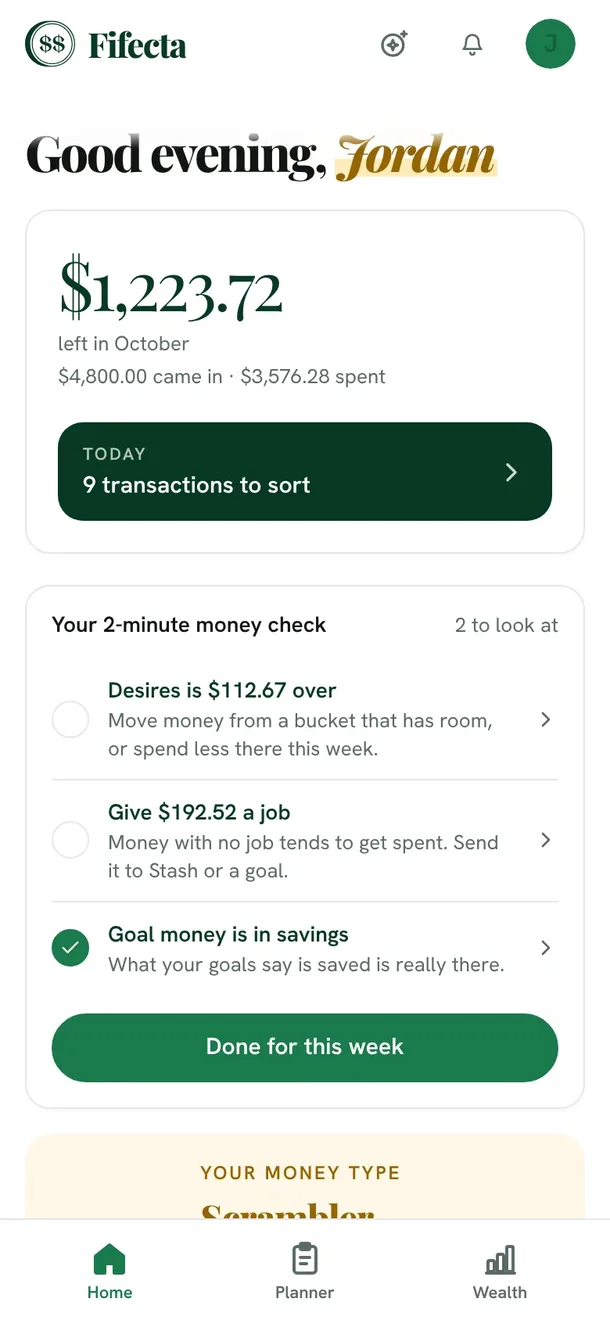

Actual Budget MCP
AI money tool
Visit site for Actual Budget (opens in a new tab)Actual Budget is an open source, local-first budgeting app built on envelope budgeting that you can self-host.
Looking for the best MCP for your own money, not a business? Here is how a self-hosted Actual Budget setup with a community MCP server compares with Fifecta's hosted, read-only connector.

Short answer
The best MCP for money depends on how much you want to run yourself. Actual Budget is open source and local-first, and a community MCP server for it can read and write your budget. Fifecta, which we make, is hosted and read-only: paste a link, sign in, and approve. Choose control or convenience.
Full disclosure: Taylor Price, who runs Priceless Tay, owns Fifecta, so keep that in mind as you read this comparison.
Fifecta vs Actual Budget MCP at a glance
- Fifecta
- Price
- $15a month
- Free trial
- 7 days
- Rating
- Not ratedWeb app, not in app stores
- Platforms
- 3Web, iPhone (home screen install), Android (home screen install)
- Actual Budget MCP
- Price
- Free
- Free trial
- None
- Rating
- Not ratedDesktop and web app; its official mobile apps are deprecated
- Platforms
- 4Windows, macOS, Linux, Web (installable PWA)
Business money MCPs vs personal money MCPs
Ask an AI for the best MCP for money and you'll often get tools built for businesses, like payments and company spending. Those solve a different problem. This page is about your own money: your budget, your bills, and what's left before payday.
What Actual Budget and its MCP server are
Actual Budget calls itself “a local-first personal finance app” built on envelope budgeting. It's open source under the MIT license, and you can self-host its sync server with optional end-to-end encryption. Source: actualbudget.org (2026), GitHub (2026)
The MCP server compared here, s-stefanov/actual-mcp, is a community project, also MIT licensed, and not listed as made by Actual. It connects Claude Desktop or another MCP client to your Actual data. Source: GitHub (2026)
What Fifecta's connector is
Fifecta is a hosted budgeting and coaching app. Its connector lets Claude or ChatGPT read your Fifecta plan: your buckets planned and spent, goals, debts, and net worth. It's read-only by design, you sign in to Fifecta to approve it, and every tool call is written to an audit log.
What it costs
- Fifecta
$15a month
Fifecta costs $15 a month or $150 a year.
$150 a year at the yearly list price, or $450 over 3 years, before tax.
Source
pricelesstay.com/fifecta, checked . - Actual Budget
Actual is free and open source, and its desktop apps run locally.
Source
github.com/actualbudget/actual, checked .
Bars show only when every app here lists a yearly price, so these prices sit side by side without them. Prices are list prices from each app's own page, before tax and any offer.
Features
| Feature | Fifecta | Actual Budget MCP |
|---|---|---|
| Savings goals | Yes | Yes |
| Shared budgets | Yes | Yes |
| Investment tracking | Yes | Yes |
| Data export | Yes | Yes |
| API or MCP | Yes | Yes |
Fifecta also lists AI features.
Sources for these features
Yes means the official site lists it. No means the official site says the app doesn't have it.
- Fifecta: pricelesstay.com/fifecta-ai, checked Oct 25, 2026.AI features: Ask Penny: plain-English questions answered from your own numbers; monthly allowance resets on the 1st. pricelesstay.com/fifecta, checked Oct 25, 2026.Savings goals: Goals with a monthly savings number. pricelesstay.com/fifecta, checked Oct 25, 2026.Shared budgets: Invite a partner to share your budget; they can see and edit your plan, transactions and goals. pricelesstay.com/fifecta-terms, checked Oct 25, 2026.Investment tracking: Net worth includes investment accounts. pricelesstay.com/fifecta, checked Oct 25, 2026.Data export: Export from Settings, then Your data. Format not stated. pricelesstay.com/fifecta-terms, checked Oct 25, 2026.API or MCP: Connect your own AI assistant, such as Claude or ChatGPT: 'it can read your Fifecta data but can't change it.' Disconnect it in Settings, Your data, Connected apps. pricelesstay.com/fifecta-terms, checked Oct 25, 2026.
- Actual Budget MCP: actualbudget.org/docs/tour/accounts, checked Oct 24, 2026.Savings goals: Goal templates are an experimental feature (#template / #goal lines in category notes), including saving up for a future purchase. actualbudget.org/docs/experimental/goal-templates, checked Oct 25, 2026.Shared budgets: Partners can share one budget file; the self-hosted server supports multiple users with their own logins (OpenID). actualbudget.org/docs/budgeting/joint-accounts, checked Oct 25, 2026.Investment tracking: Off budget accounts track investment balances over time; transactions there can't be categorized. actualbudget.org/docs/accounts, checked Oct 25, 2026.Data export: Export from the account menu. The page doesn't state the format. actualbudget.org/docs/tour/accounts, checked Oct 24, 2026.API or MCP: Official API that runs on your local data (docs at https://actualbudget.org/docs/api/). The MCP server is a community project, not Actual's. actualbudget.org, checked Oct 25, 2026.
Fifecta and Actual Budget, side by side
| Detail | FifectaOur app | Actual Budget MCP |
|---|---|---|
| Free trialDiffers | FifectaFifecta is free for 7 days, and you can cancel anytime in the app. Sourcepricelesstay.com/fifecta, checked . | Actual Budget MCPActual needs no trial: it says it is 100% free and open source. Sourcegithub.com/actualbudget/actual, checked . |
| PlatformsDiffers | FifectaFifecta lists Web, iPhone (home screen install) and Android (home screen install). Sourcepricelesstay.com/fifecta, checked . | Actual Budget MCPActual Budget lists Windows, macOS, Linux and Web (installable PWA). Sourceactualbudget.org/download, checked . |
| Bank syncingDiffers | FifectaOptional. Fifecta connects banks through Plaid with read-only access, and you can type your income and spending in by hand instead. Sourcepricelesstay.com/fifecta, checked . | Actual Budget MCPYes. Actual has built-in bank syncing through goCardless in the EU and UK and SimpleFIN in the US and Canada. Sourceactualbudget.org, checked . |
| App store ratingDiffers | FifectaWeb app, not in app stores. Sourcepricelesstay.com/fifecta, checked . | Actual Budget MCPDesktop and web app; its official mobile apps are deprecated. Sourceactualbudget.org/docs/faq, checked . |
| App typeDiffers | FifectaA hosted budgeting and coaching app, which we make. See Fifecta.As of Oct 10, 2026. This is Priceless Tay's own description of Fifecta. | Actual Budget MCP“A local-first personal finance app” with envelope budgeting. actualbudget.org Sourcegithub.com/actualbudget/actual, checked . |
| LicenseDiffers | FifectaFifecta is not open source.As of Oct 10, 2026. This is Priceless Tay's own description of Fifecta. | Actual Budget MCPActual is MIT licensed, and so is the MCP server. s-stefanov/actual-mcp Sourcegithub.com/actualbudget/actual, checked . |
| Who built the MCPDiffers | FifectaPriceless Tay, so it's official.As of Oct 10, 2026. This is Priceless Tay's own description of Fifecta. | Actual Budget MCPA community project that isn't listed as made by Actual. Sourcegithub.com/s-stefanov/actual-mcp, checked . |
| SetupDiffers | FifectaPaste the connector link, sign in, and approve. Sourcepricelesstay.com/fifecta-ai, checked . | Actual Budget MCPNode.js v16 or later, Actual installed, and Claude Desktop or another MCP client. Docker is optional. Sourcegithub.com/s-stefanov/actual-mcp, checked . |
| How it authenticatesDiffers | FifectaSign in to Fifecta. OAuth 2.1 with PKCE S256 is required.As of Oct 10, 2026. This is Priceless Tay's own description of Fifecta. | Actual Budget MCPThe config uses your Actual server URL and ACTUAL_PASSWORD, plus an optional encryption password.Sourcegithub.com/s-stefanov/actual-mcp, checked . |
| Read or writeDiffers | FifectaRead-only by design. Sourcepricelesstay.com/fifecta-ai, checked . | Actual Budget MCPRead and write. The tools include create and update transaction, delete category, delete rule and more. Sourcegithub.com/s-stefanov/actual-mcp, checked . |
| ReportsDiffers | FifectaPlan vs spent per bucket, goals, debts and net worth. Sourcepricelesstay.com/fifecta-ai, checked . | Actual Budget MCP spending-by-category, budget-vs-actual, net-worth, cash-flow and more.Sourcegithub.com/s-stefanov/actual-mcp, checked . |
| Data ownershipDiffers | FifectaYour data is hosted by Fifecta.As of Oct 10, 2026. This is Priceless Tay's own description of Fifecta. | Actual Budget MCPYou can self-host the sync server, with optional end-to-end encryption. Sourceactualbudget.org, checked . |
| Works withDiffers | FifectaClaude and ChatGPT. Sourcepricelesstay.com/fifecta-ai, checked . | Actual Budget MCPClaude Desktop “or another MCP-compatible client.” We couldn't confirm ChatGPT support. Sourcegithub.com/s-stefanov/actual-mcp, checked . |
Fifecta is our own app. Taylor Price, who runs Priceless Tay, owns Fifecta, so keep that in mind as you read this comparison.
Store ratings are a dated snapshot from each listing, not our score. A row shows only when both apps have a current official source for it. How we source and date this data. Spotted a change? Tell us if something changed.
Weighing a third option? Add up to two more apps and compare up to four side by side.
Screen by screen
Pick a task to see what each app shows for it. App Store and Google Play images are the apps' own marketing, so they can show sample data and staged layouts. Help center images come from the app's support articles. See every app's screens.
Home
Fifecta
From Fifecta's websiteThe Fifecta app Home screen on a phone: "Good evening, Jordan," $1,223.72 left in October ($4,800.00 came in, $3,576.28 spent), a Today card with 9 transactions to sort, and a 2-minute money check with Home, Planner and Wealth tabs at the bottom.fifecta.pricelesstay.com, as of 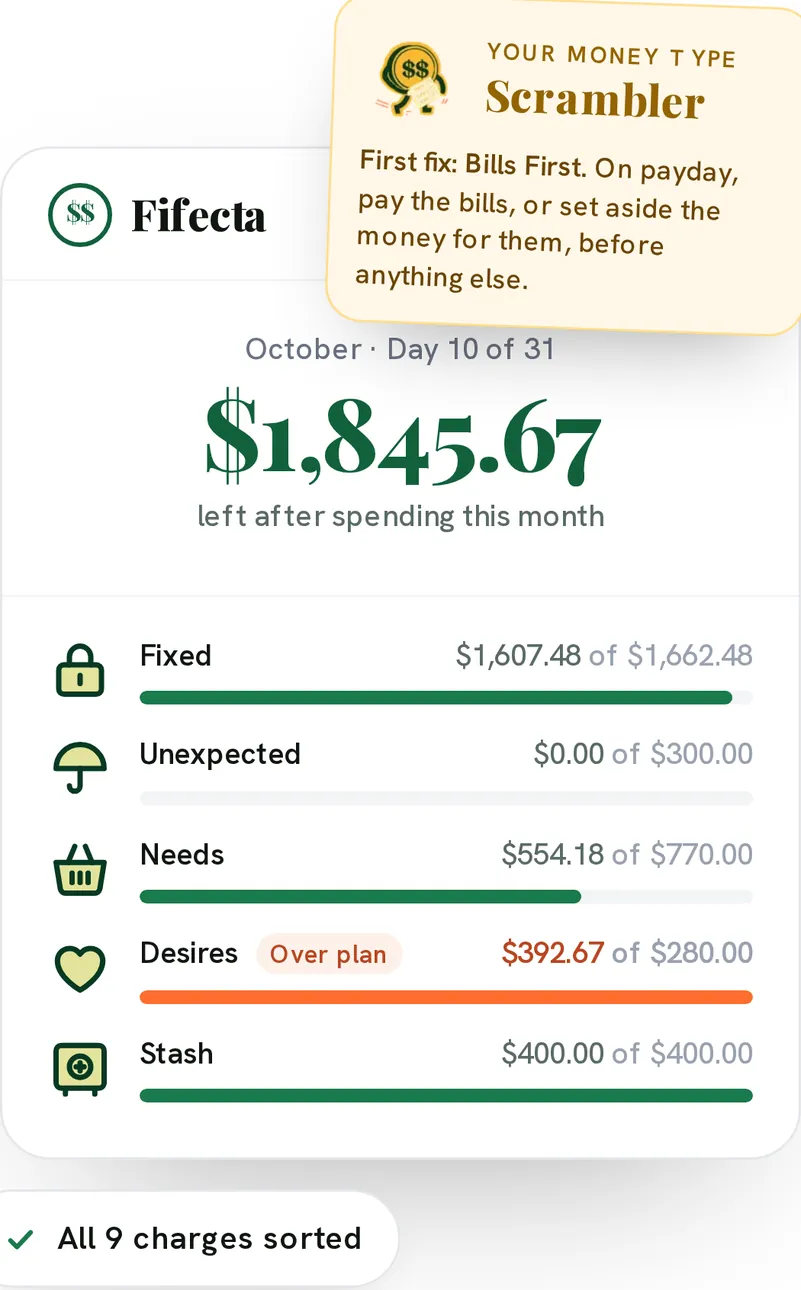
From Fifecta's websiteA Fifecta month card for October, Day 10 of 31: $1,845.67 left after spending this month, with Fixed, Unexpected, Needs, Desires and Stash progress bars, Desires marked Over plan, a Scrambler Money Type note and an All 9 charges sorted chip.pricelesstay.com, as of 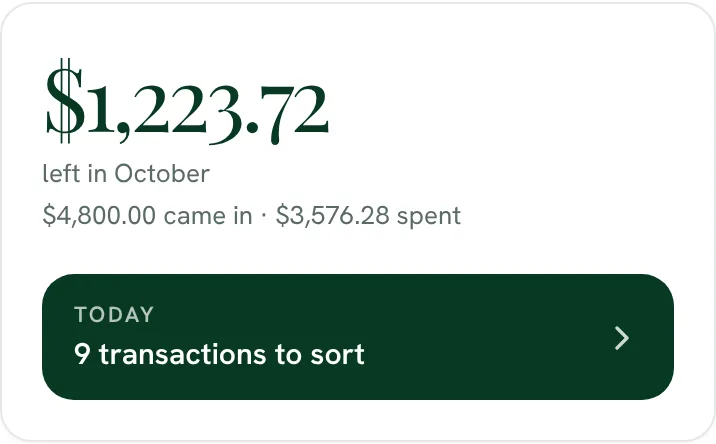
From Fifecta's website$1,223.72 left in October, with $4,800.00 came in and $3,576.28 spent, and a Today button for 9 transactions to sort.fifecta.pricelesstay.com, as of 
From Fifecta's websiteOctober, Day 10 of 31: $1,845.67 left after spending this month.pricelesstay.com, as of
Actual Budget
No official screen found yet
Accounts
Fifecta
No official screen found yet
Actual Budget
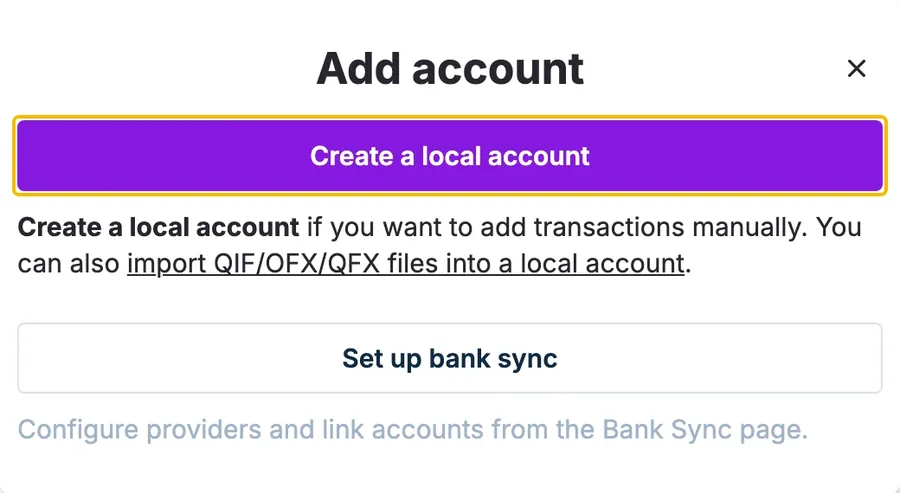
From Actual Budget's help centerThe Add account dialog with a Create a local account button, a note about importing QIF, OFX and QFX files, and a Set up bank sync button.actualbudget.org, as of
Transactions
Fifecta
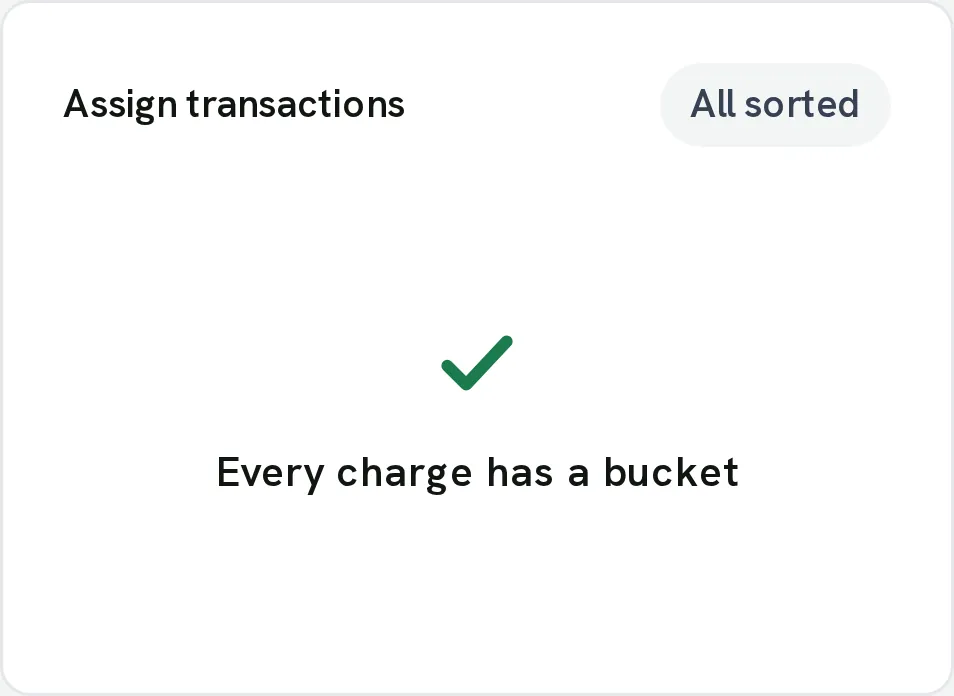
From Fifecta's websiteAssign transactions with an All sorted chip, a green check mark and "Every charge has a bucket."pricelesstay.com, as of
Actual Budget
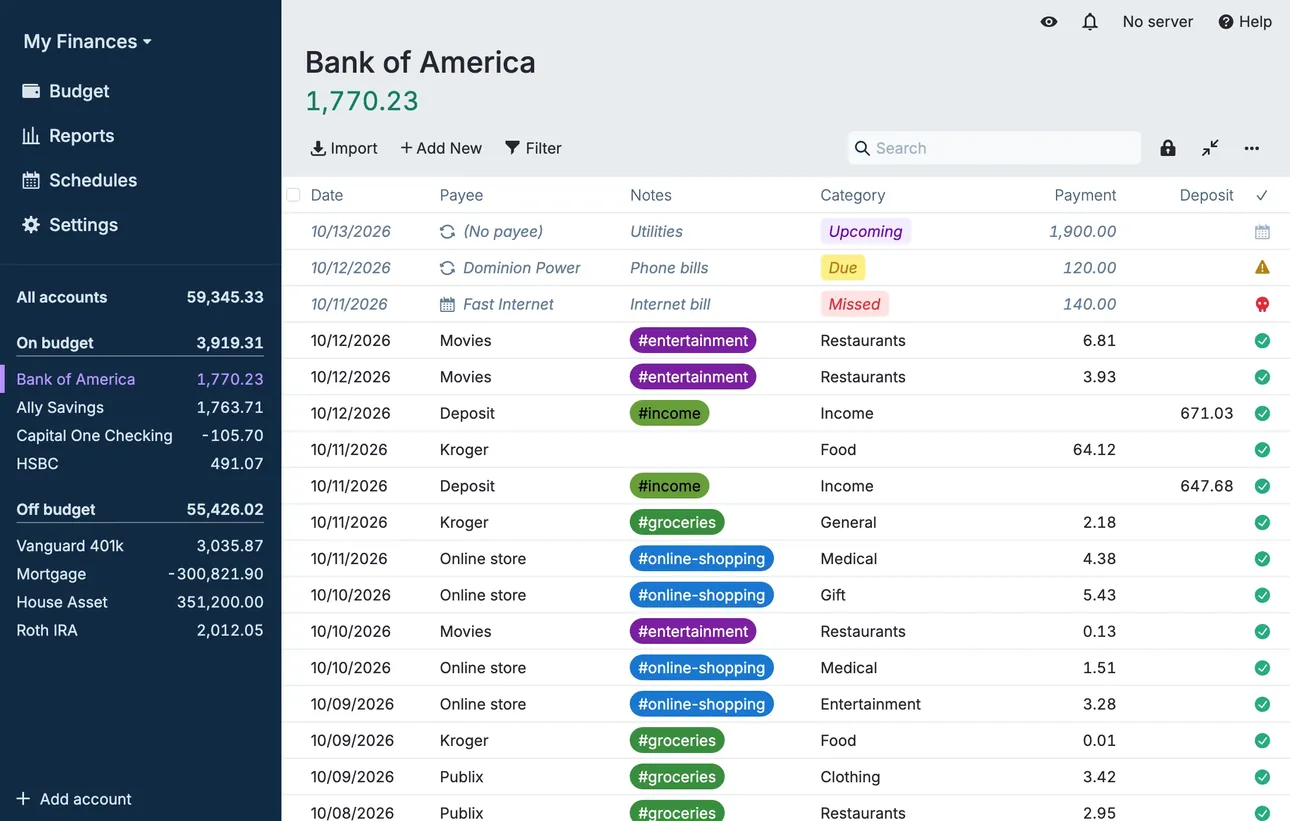
From Actual Budget's help centerThe account register for Bank of America with dated transactions, payees, category tags and payment and deposit columns.actualbudget.org, as of 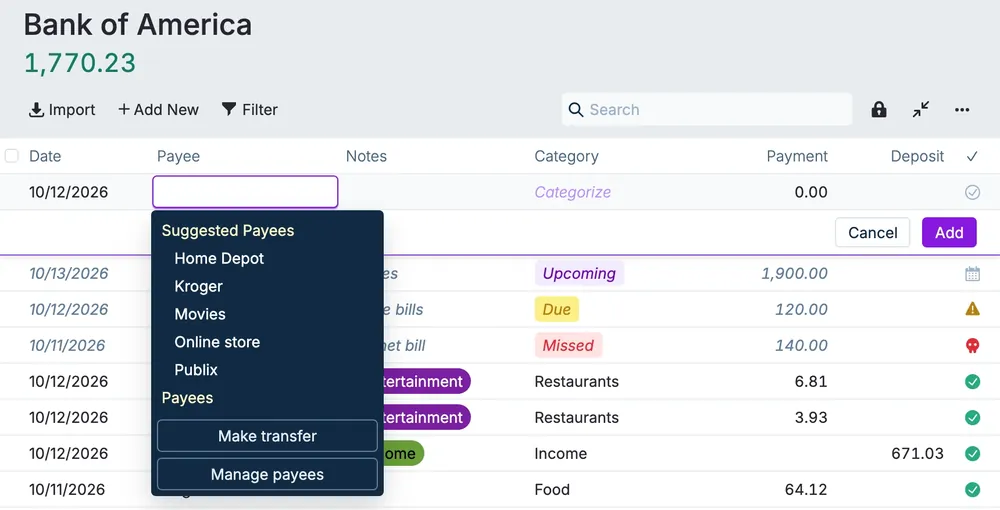
From Actual Budget's help centerA new transaction row with the payee menu open, listing suggested payees and a Make transfer option.actualbudget.org, as of
Budget
Fifecta
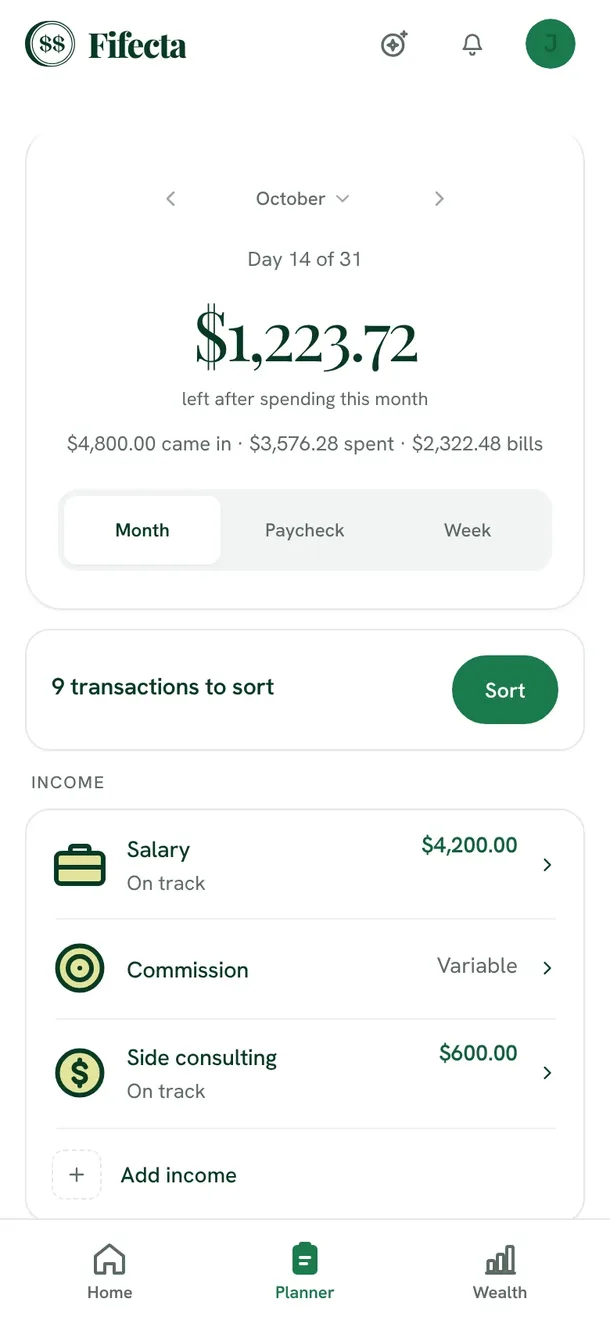
From Fifecta's websiteThe Fifecta Planner on a phone: October, Day 14 of 31, $1,223.72 left after spending this month, Month, Paycheck and Week views, 9 transactions to sort, and income lines for Salary, Commission and Side consulting.fifecta.pricelesstay.com, as of 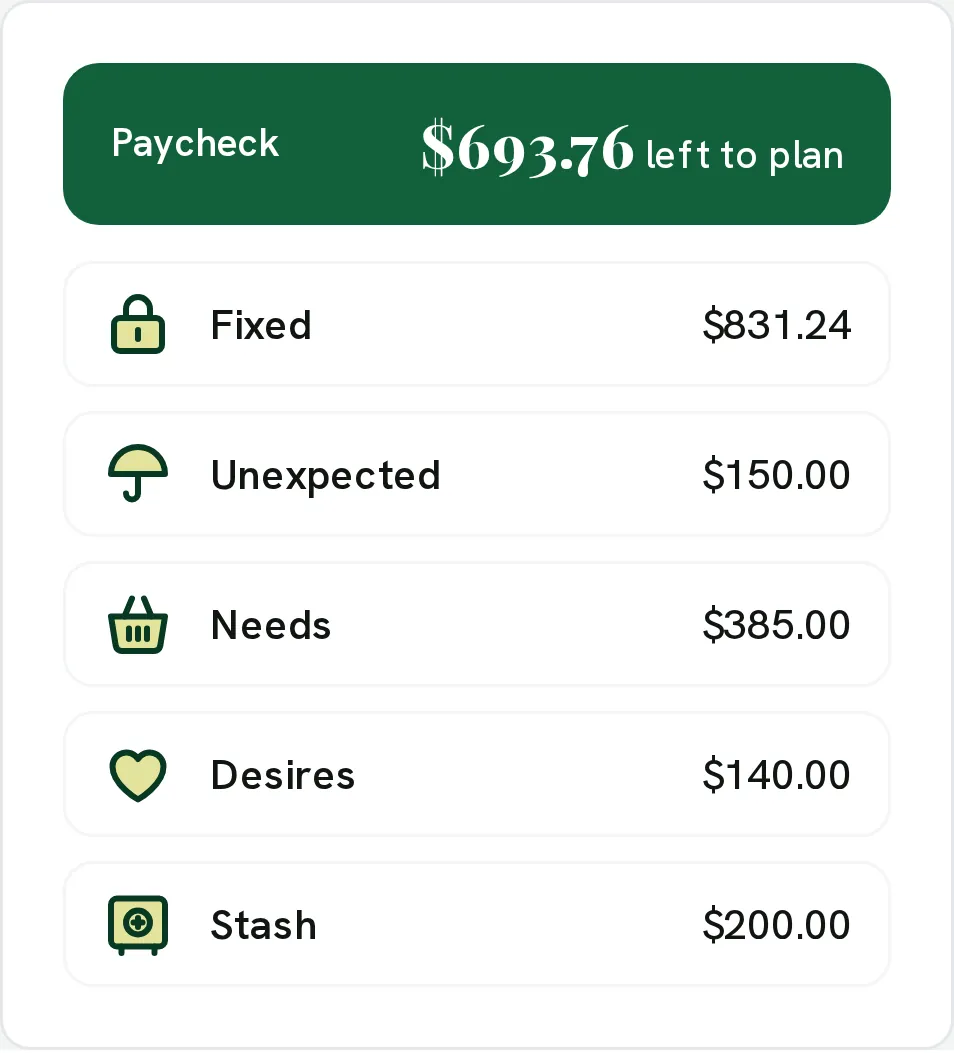
From Fifecta's websiteA paycheck plan: Paycheck $693.76 left to plan, with Fixed $831.24, Unexpected $150.00, Needs $385.00, Desires $140.00 and Stash $200.00.pricelesstay.com, as of 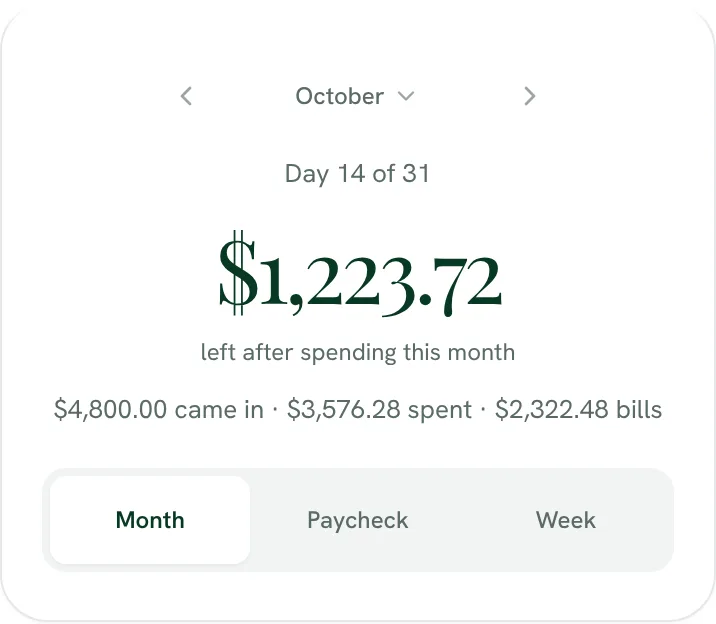
From Fifecta's websiteDay 14 of 31: $1,223.72 left after spending this month ($4,800.00 came in, $3,576.28 spent, $2,322.48 bills), with a Month, Paycheck and Week switch.fifecta.pricelesstay.com, as of 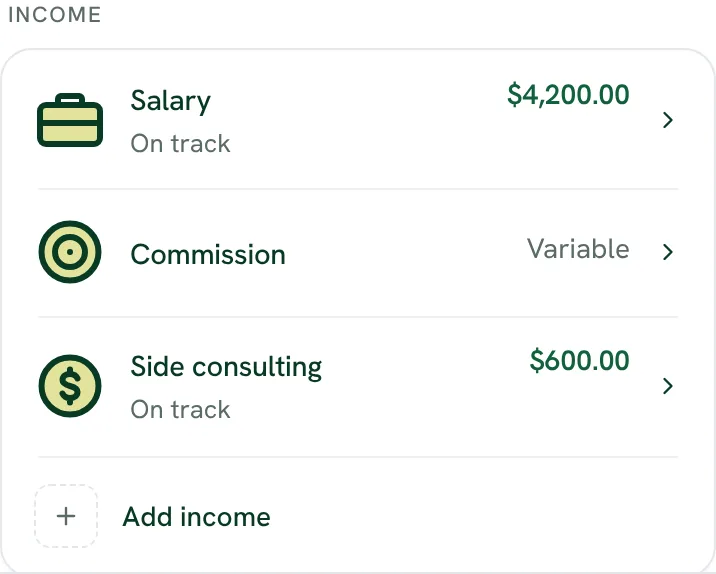
From Fifecta's websiteIncome: Salary $4,200.00 on track, Commission marked Variable, Side consulting $600.00 on track, and Add income.fifecta.pricelesstay.com, as of 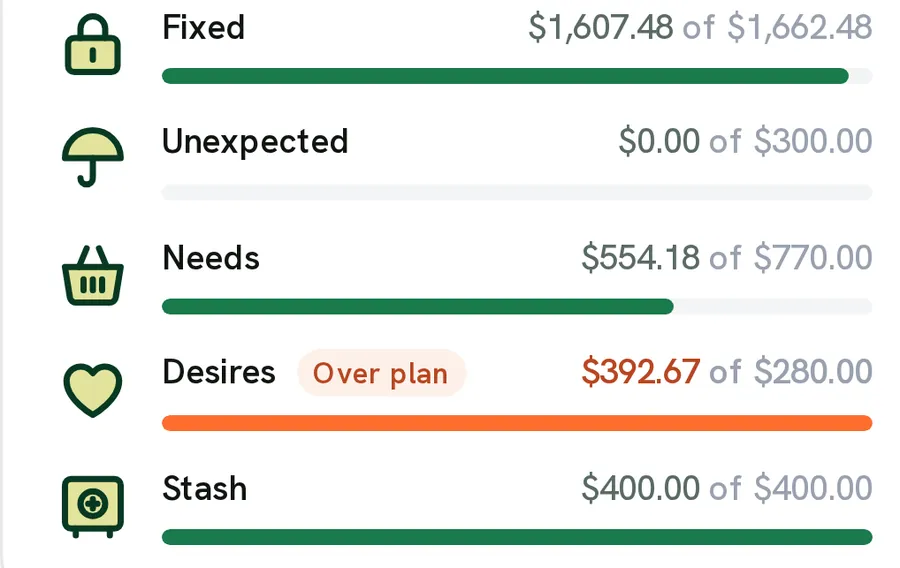
From Fifecta's websiteBucket bars: Fixed $1,607.48 of $1,662.48, Unexpected $0.00 of $300.00, Needs $554.18 of $770.00, Desires $392.67 of $280.00 marked Over plan, and Stash $400.00 of $400.00.pricelesstay.com, as of 
From Fifecta's websiteA green Paycheck bar reading $693.76 left to plan.pricelesstay.com, as of
Actual Budget
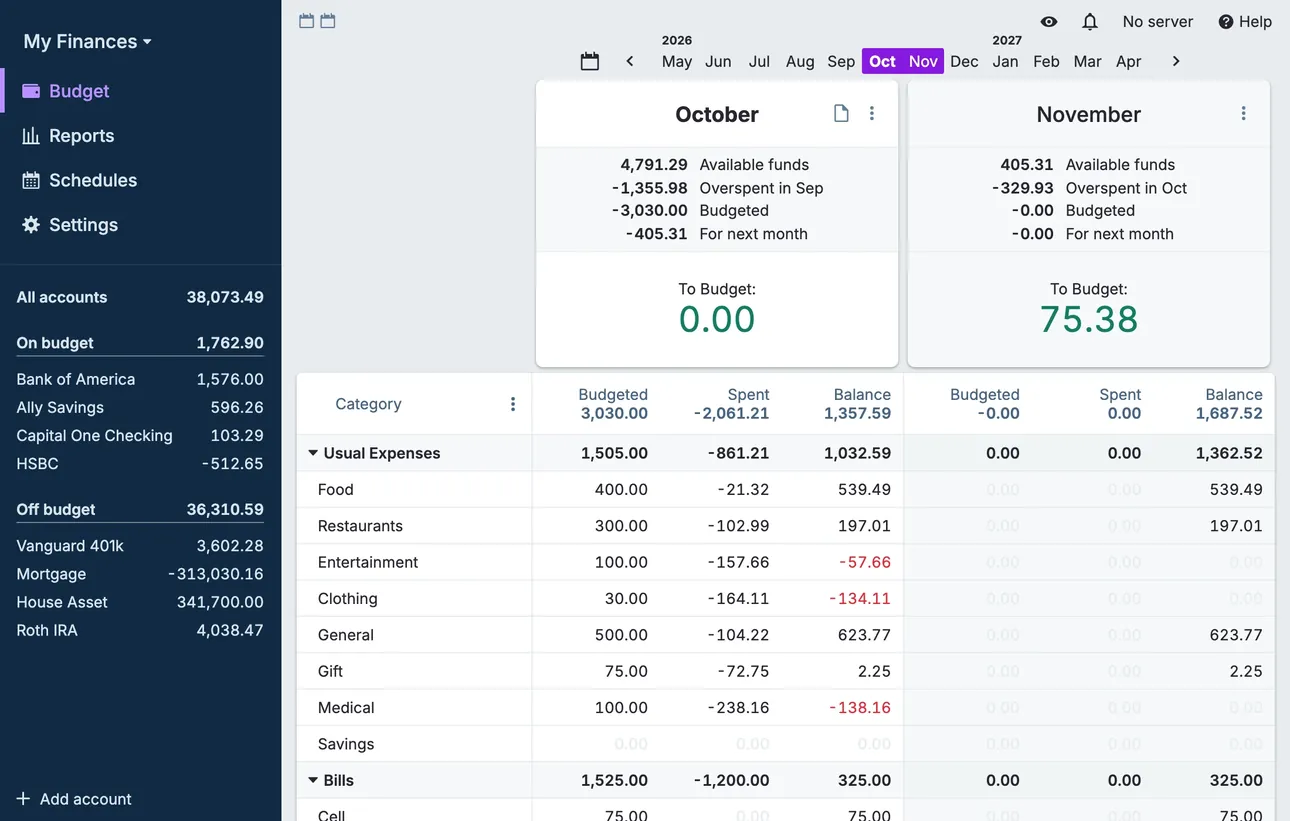
From Actual Budget's help centerThe desktop budget page with two months side by side, category rows with budgeted, spent and balance columns, and accounts in the sidebar.actualbudget.org, as of 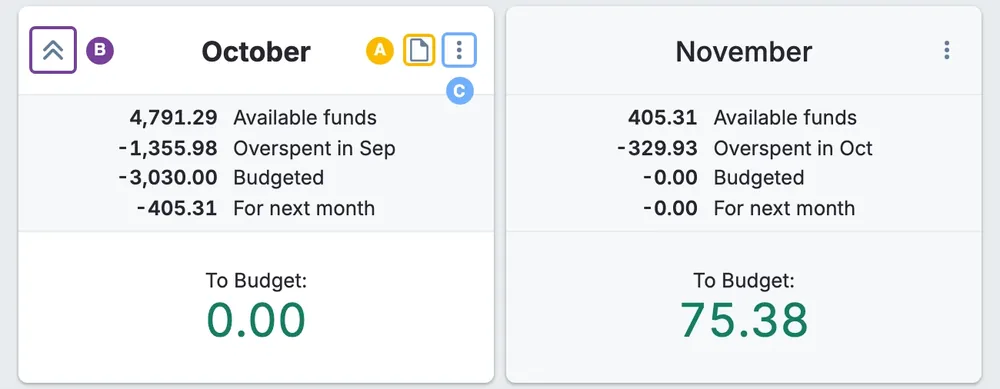
From Actual Budget's help centerMonth summary cards for October and November with available funds, overspent, budgeted and To Budget amounts.actualbudget.org, as of 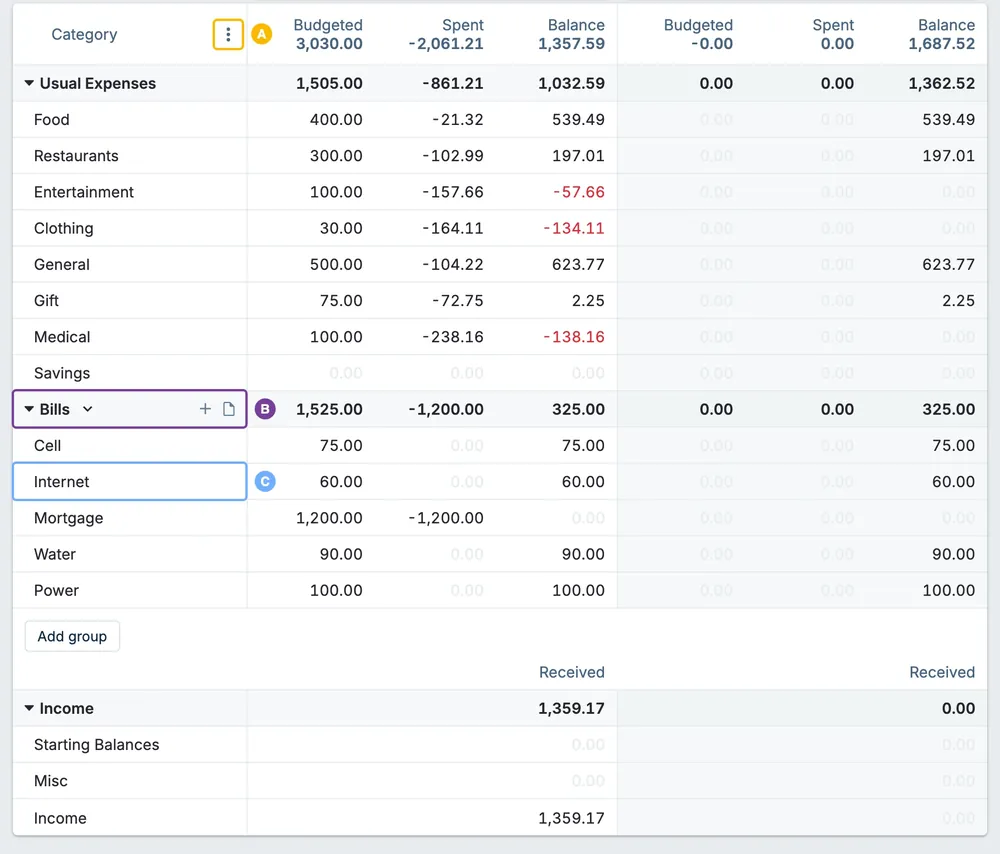
From Actual Budget's help centerA budget table of category groups with budgeted, spent and balance columns for two months.actualbudget.org, as of 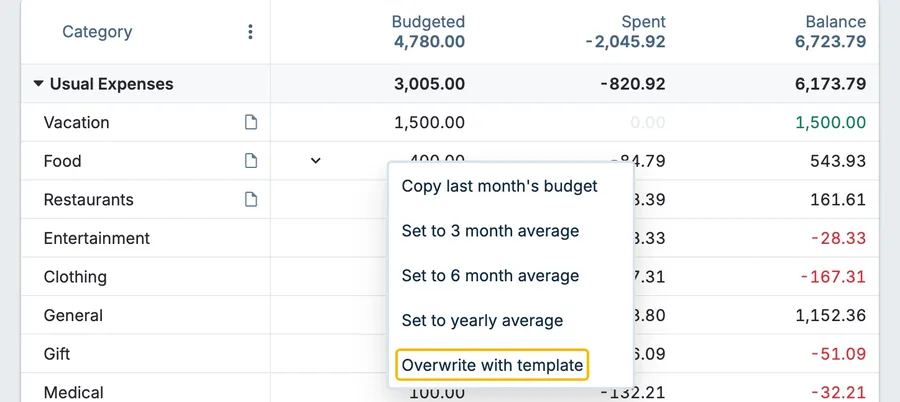
From Actual Budget's help centerA category budget menu with Copy last month's budget, Set to 3 month average, Set to 6 month average, Set to yearly average and Overwrite with template.actualbudget.org, as of
Categories
Fifecta
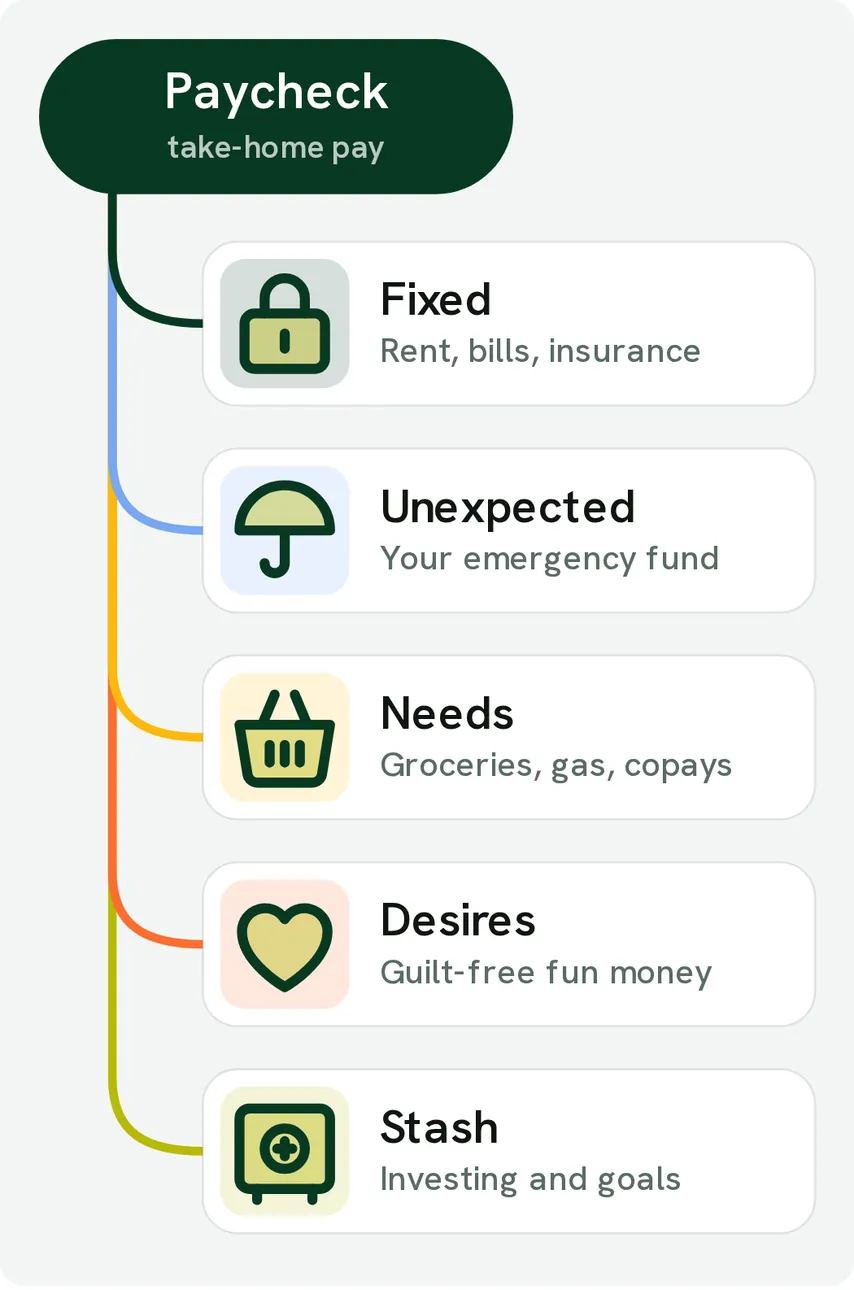
From Fifecta's websiteA diagram of a Paycheck, take-home pay, branching into Fixed (rent, bills, insurance), Unexpected (your emergency fund), Needs (groceries, gas, copays), Desires (guilt-free fun money) and Stash (investing and goals).pricelesstay.com, as of 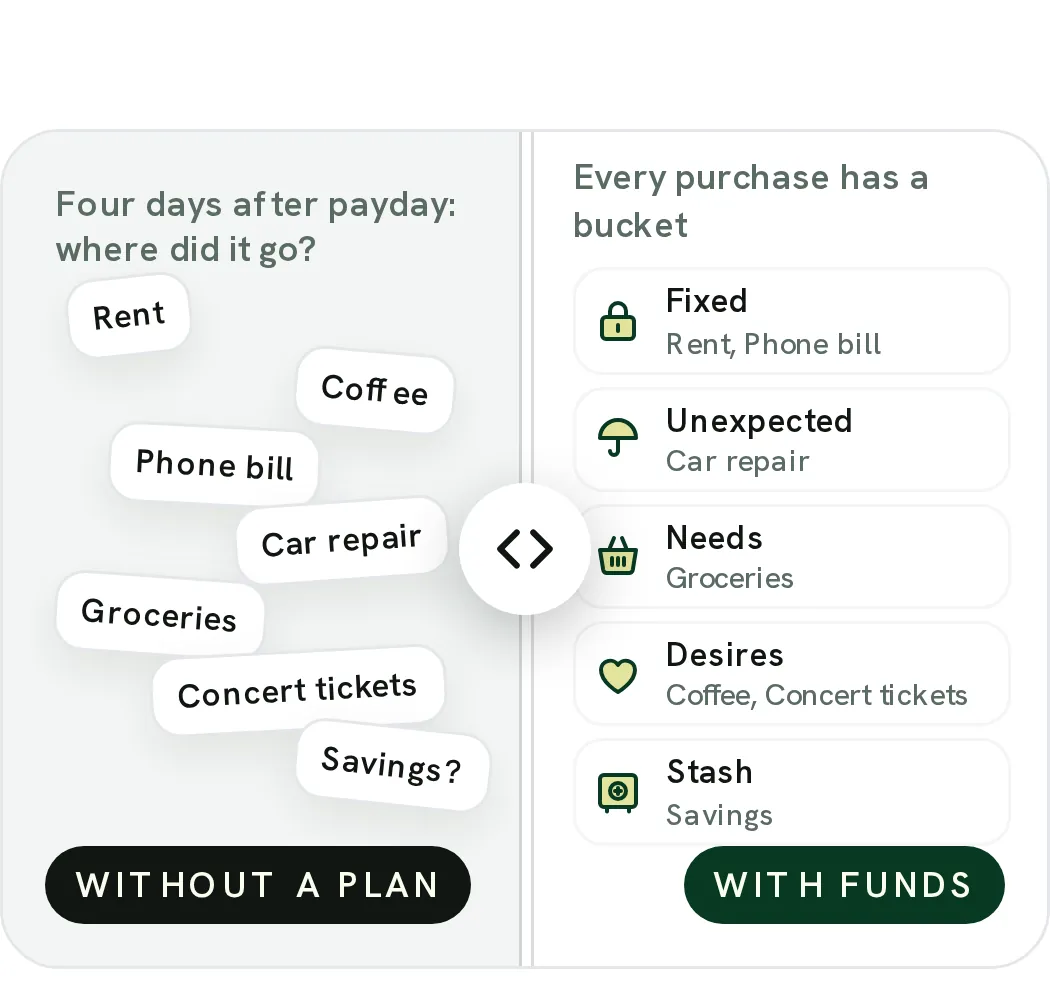
From Fifecta's websiteA Without a plan and With FUNDS slider: on one side loose labels like Rent, Coffee and Car repair under "Four days after payday: where did it go?", on the other every purchase in a bucket, such as Coffee and Concert tickets under Desires.pricelesstay.com, as of 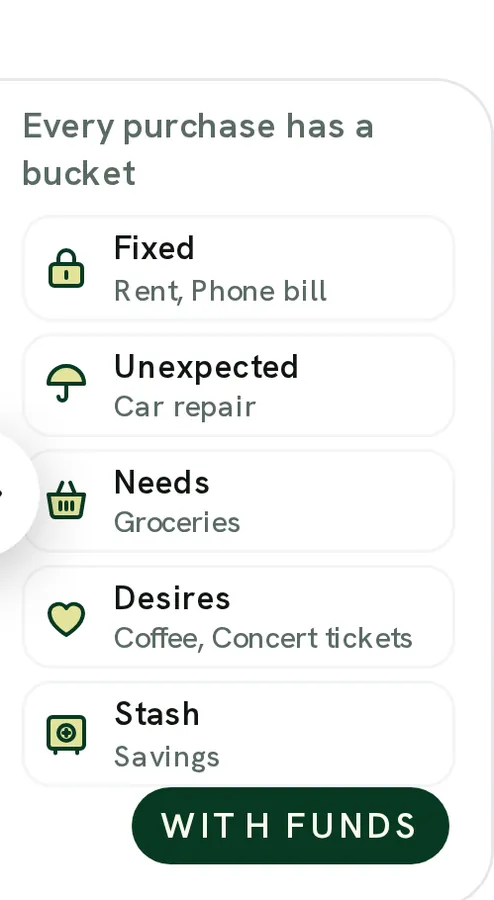
From Fifecta's websiteWith FUNDS: "Every purchase has a bucket" with Fixed (rent, phone bill), Unexpected (car repair), Needs (groceries), Desires (coffee, concert tickets) and Stash (savings).pricelesstay.com, as of
Actual Budget
No official screen found yet
Goals
Fifecta
No official screen found yet
Actual Budget
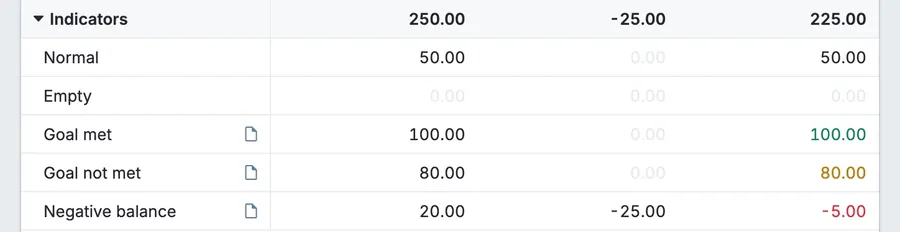
From Actual Budget's help centerGoal template indicators in a budget group: Goal met with a green 100.00 balance, Goal not met with an amber 80.00, a Normal row, an Empty row and a red Negative balance of -5.00.actualbudget.org, as of 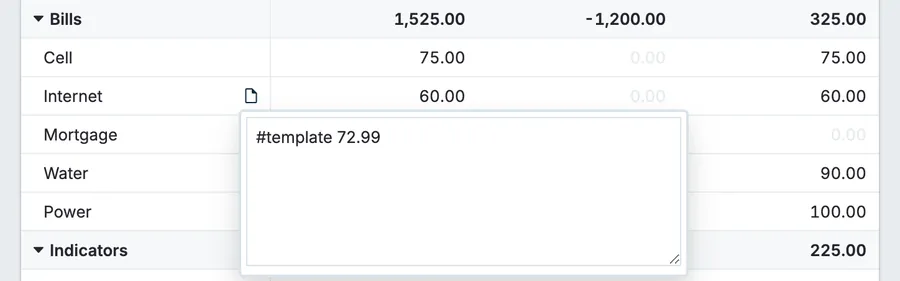
From Actual Budget's help centerA Bills group with an Internet category note open showing "#template 72.99" next to budgeted, spent and balance columns.actualbudget.org, as of
Reports and insights
Fifecta
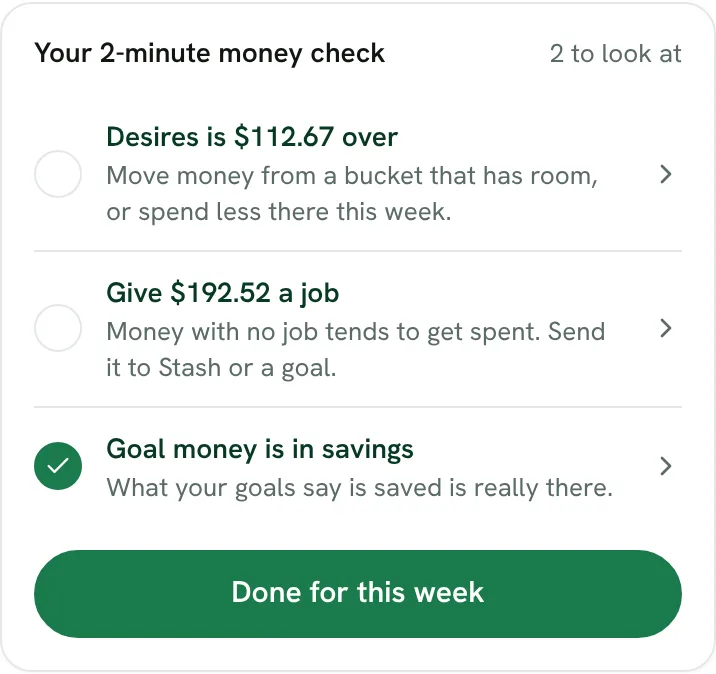
From Fifecta's websiteYour 2-minute money check, 2 to look at: "Desires is $112.67 over," "Give $192.52 a job" and a checked "Goal money is in savings," with a Done for this week button.fifecta.pricelesstay.com, as of 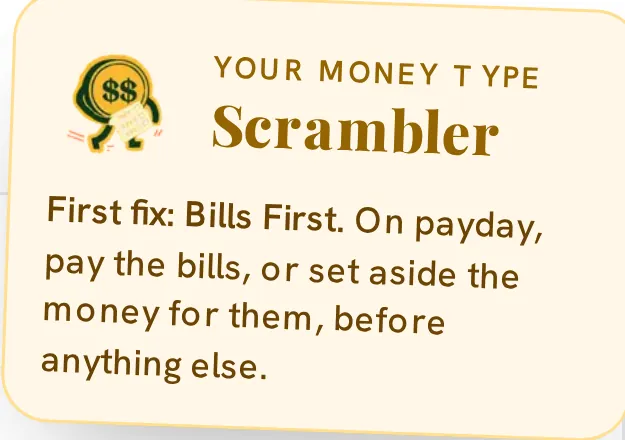
From Fifecta's websiteA Your Money Type note for Scrambler: "First fix: Bills First. On payday, pay the bills, or set aside the money for them, before anything else."pricelesstay.com, as of
Actual Budget
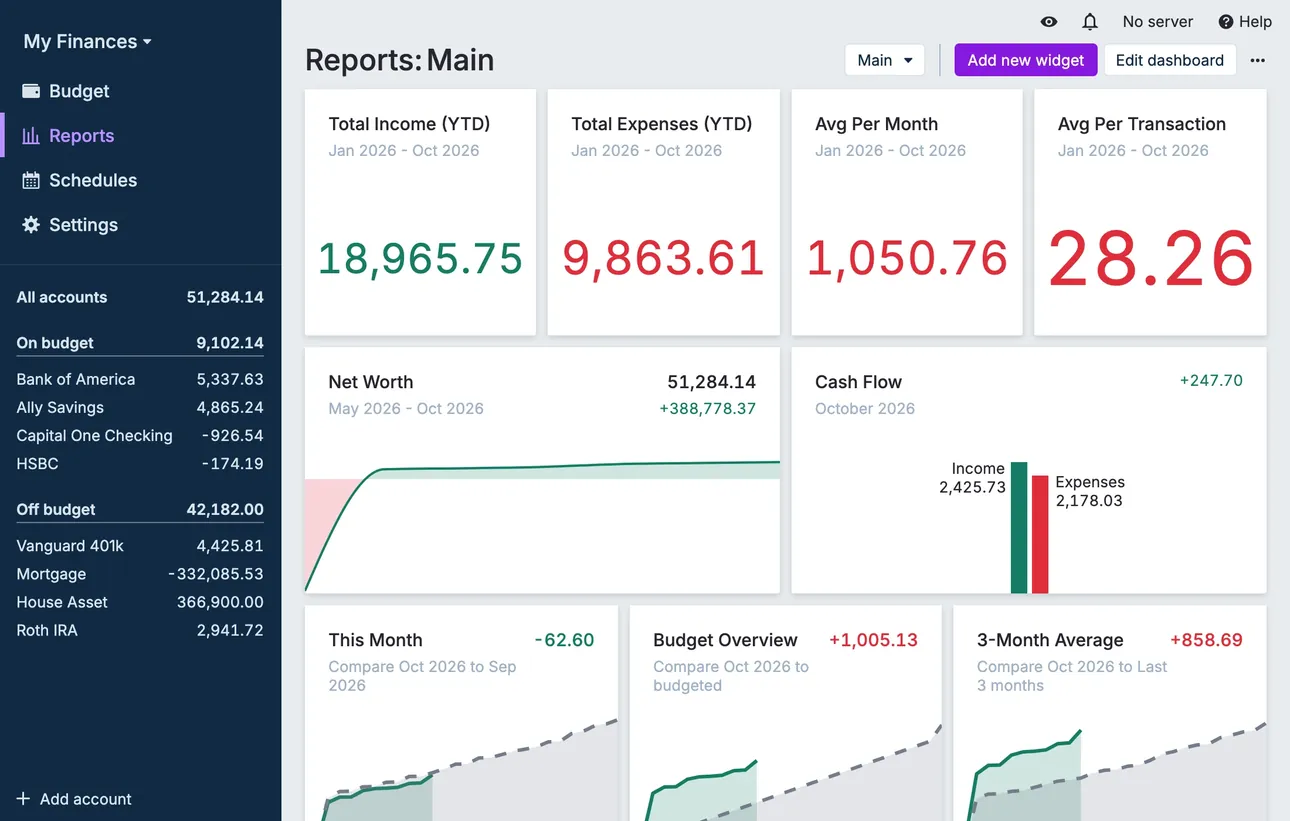
From Actual Budget's help centerThe Reports dashboard with total income and expenses, net worth and cash flow widgets.actualbudget.org, as of 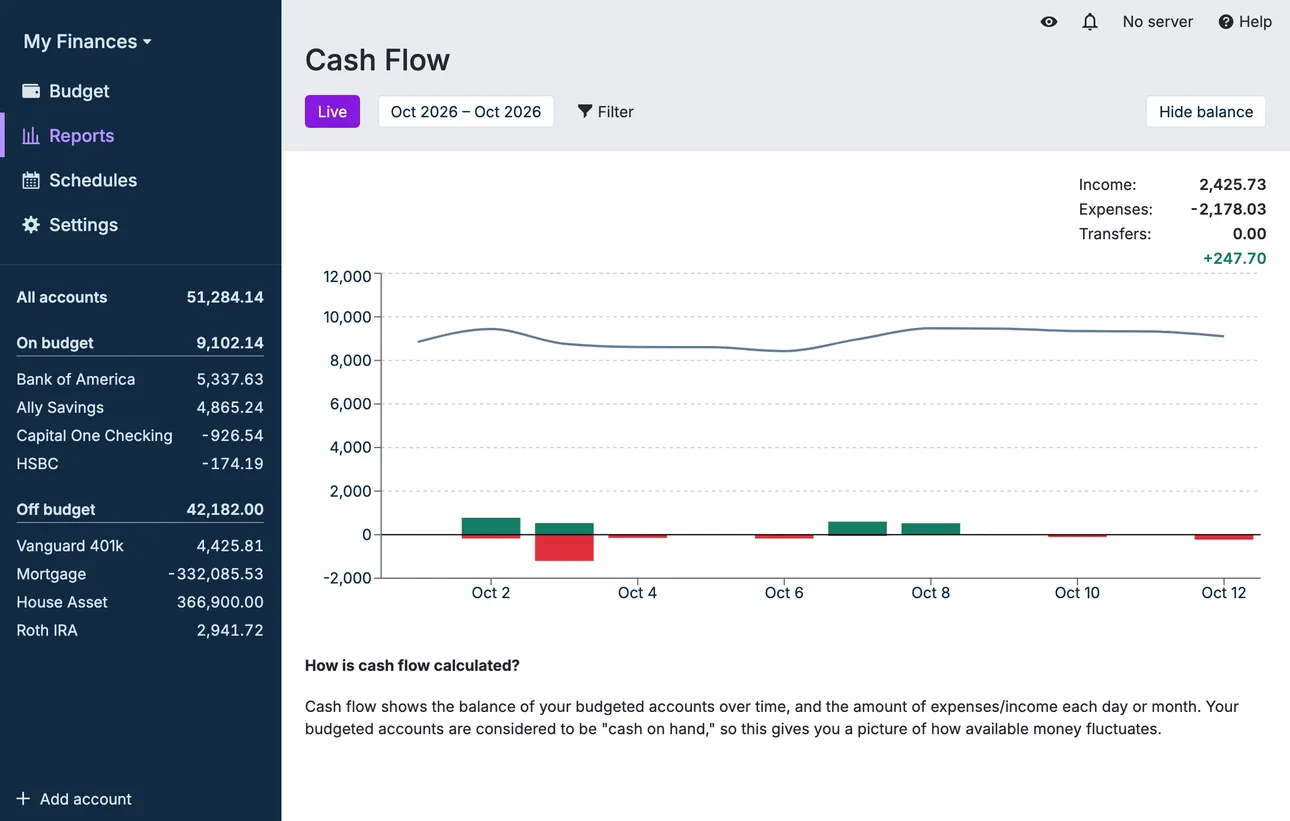
From Actual Budget's help centerA Cash Flow report with a balance line and income and expense bars.actualbudget.org, as of
Bills and recurring
Fifecta
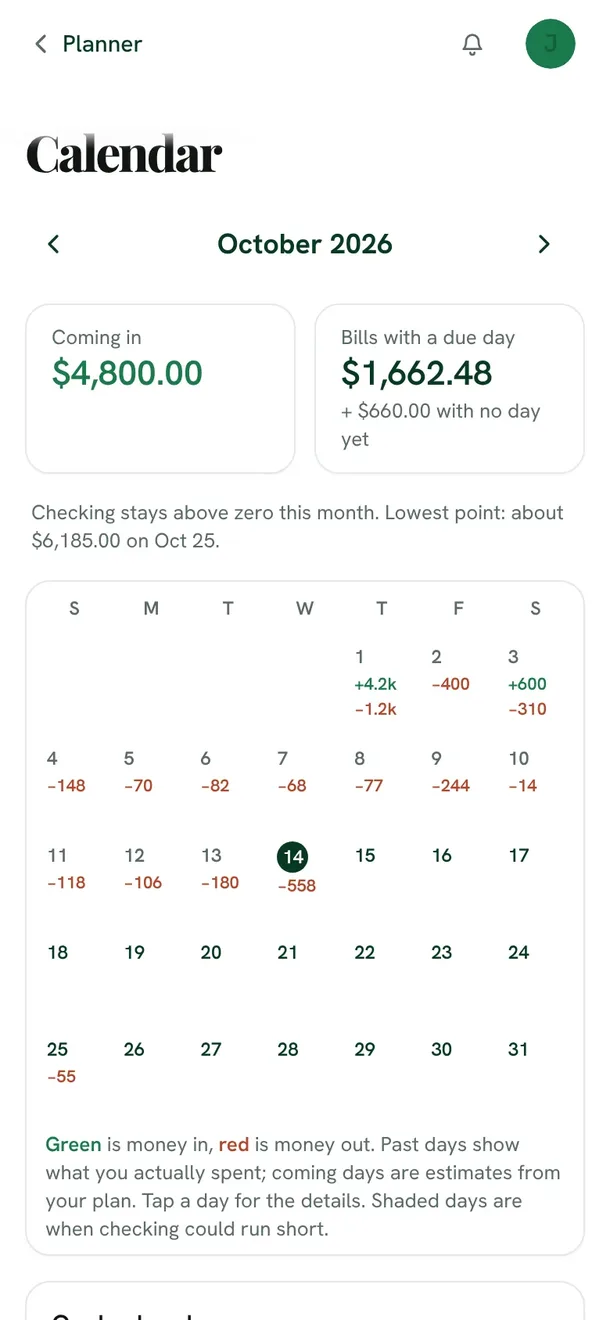
From Fifecta's websiteThe Fifecta Calendar for October 2026 on a phone: $4,800.00 coming in, $1,662.48 in bills with a due day, a note that checking stays above zero this month, and a month grid with money in and out on each day.fifecta.pricelesstay.com, as of 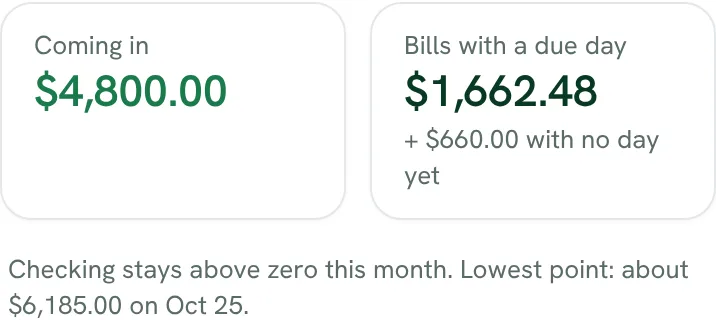
From Fifecta's websiteComing in $4,800.00, bills with a due day $1,662.48 plus $660.00 with no day yet, and "Checking stays above zero this month. Lowest point: about $6,185.00 on Oct 25."fifecta.pricelesstay.com, as of 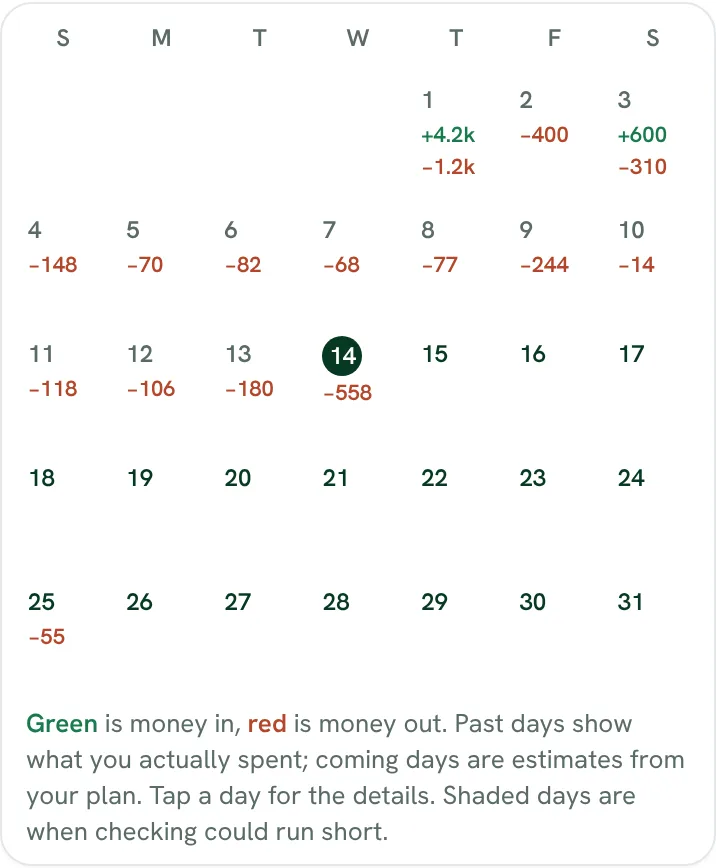
From Fifecta's websiteA month grid with money in shown in green and money out in red on each day, and a key: past days show what you spent, coming days are estimates from your plan, and shaded days are when checking could run short.fifecta.pricelesstay.com, as of
Actual Budget
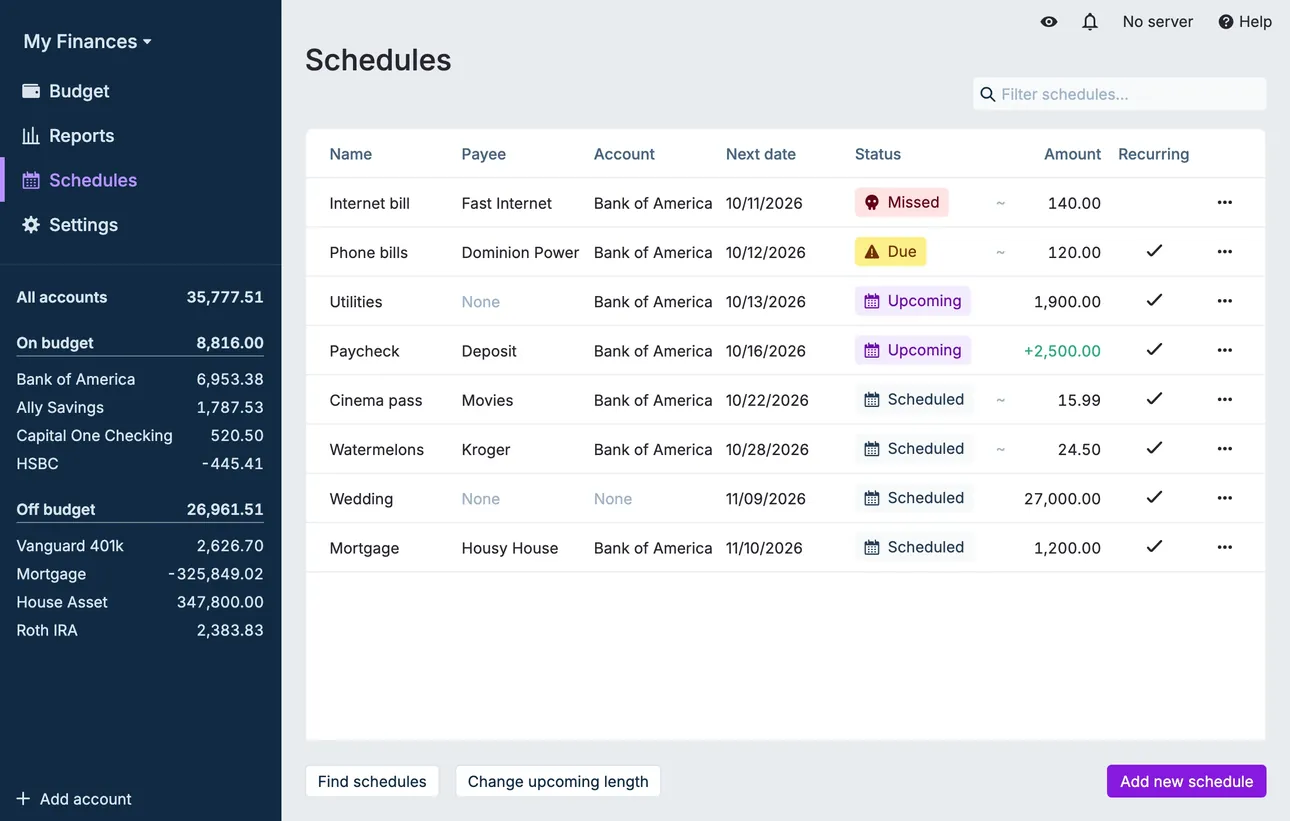
From Actual Budget's help centerThe Schedules page listing payees, accounts, next dates, statuses like Upcoming and Missed, and amounts.actualbudget.org, as of 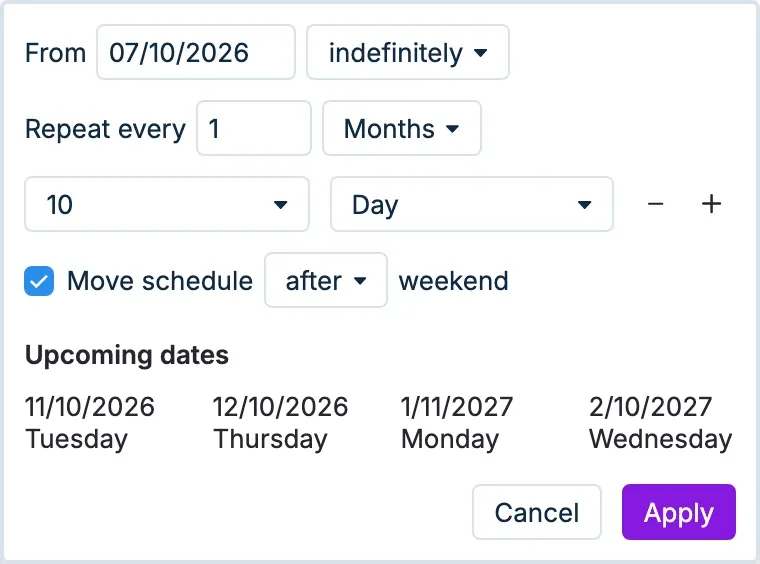
From Actual Budget's help centerRecurrence settings with a start date, Repeat every 1 month on day 10, and a list of upcoming dates.actualbudget.org, as of
Settings and security
Fifecta
No official screen found yet
Actual Budget
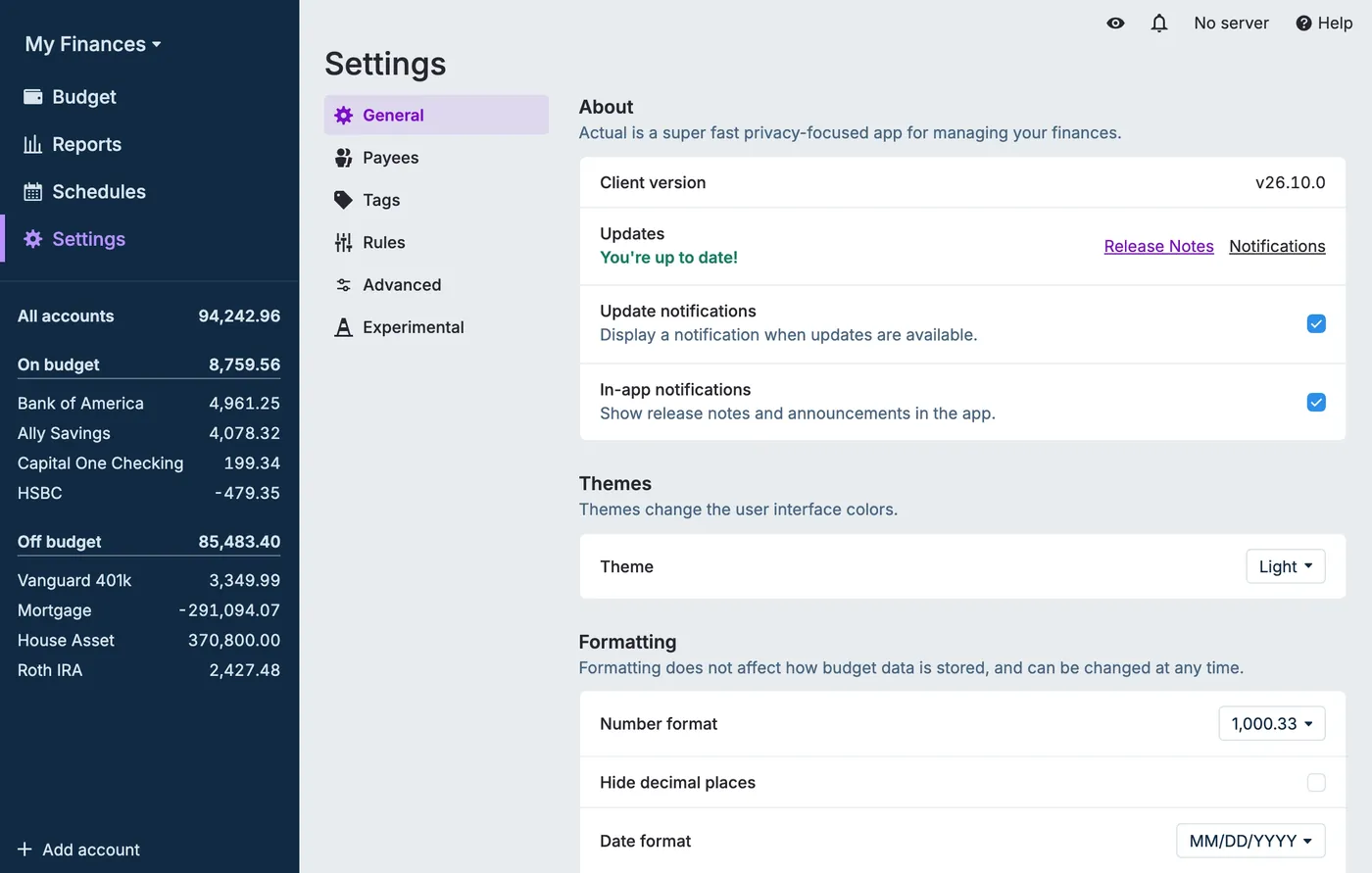
From Actual Budget's help centerThe Settings page on General: client version, an update check with release notes, notification toggles, a Light theme menu and number and date format options.actualbudget.org, as of 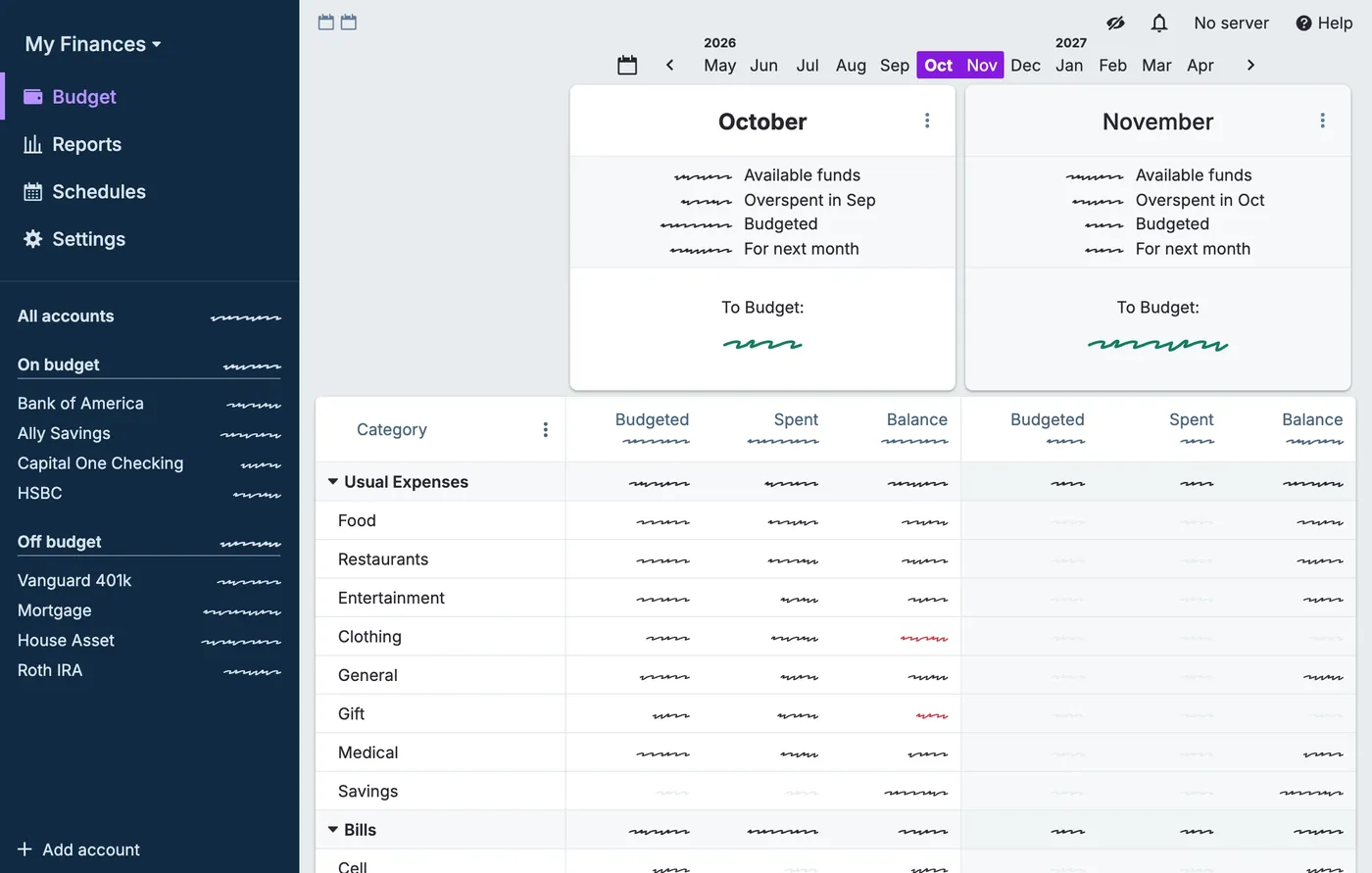
From Actual Budget's help centerThe budget page with the privacy filter on: every amount in the sidebar and budget table is shown as a squiggle instead of a number.actualbudget.org, as of
Getting started
Fifecta
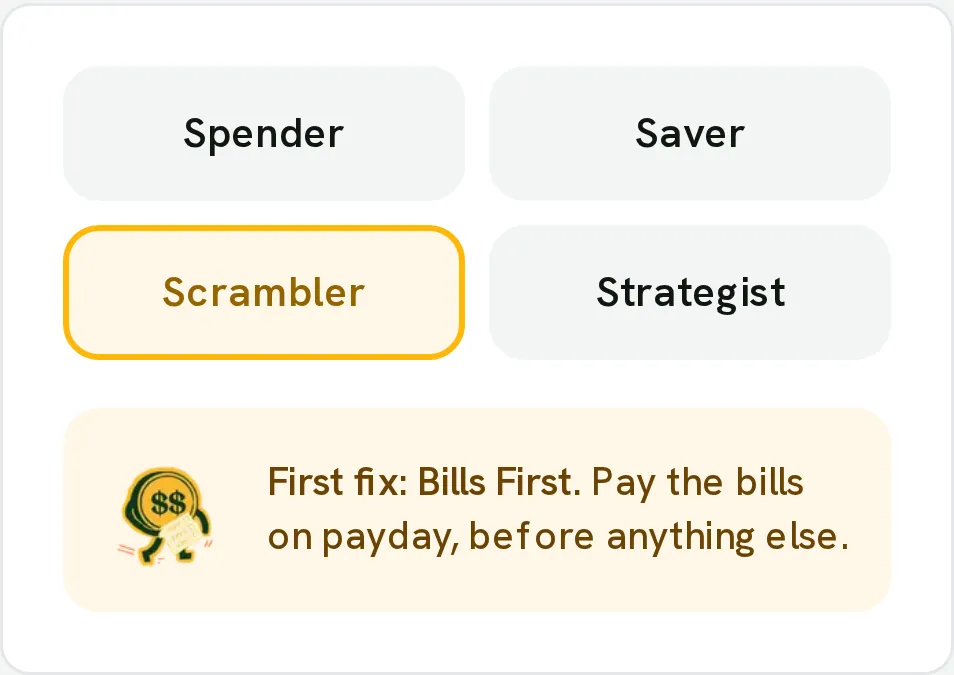
From Fifecta's websiteA Money Type picker with Spender, Saver, Scrambler and Strategist, Scrambler selected, and its first fix: "Bills First. Pay the bills on payday, before anything else."pricelesstay.com, as of
Actual Budget
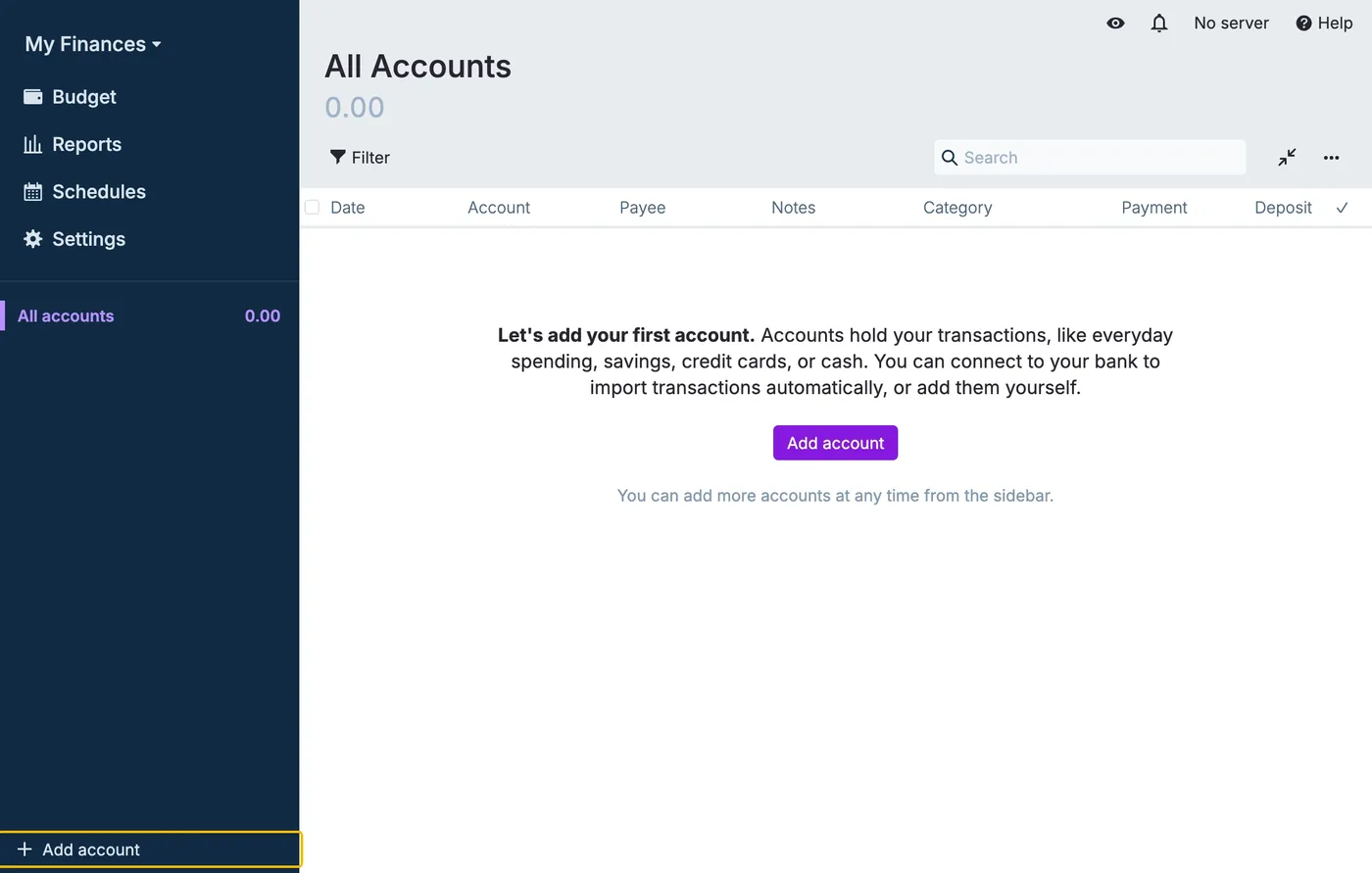
From Actual Budget's help centerA new budget's All Accounts page with an empty register and the message "Let's add your first account" above an Add account button.actualbudget.org, as of 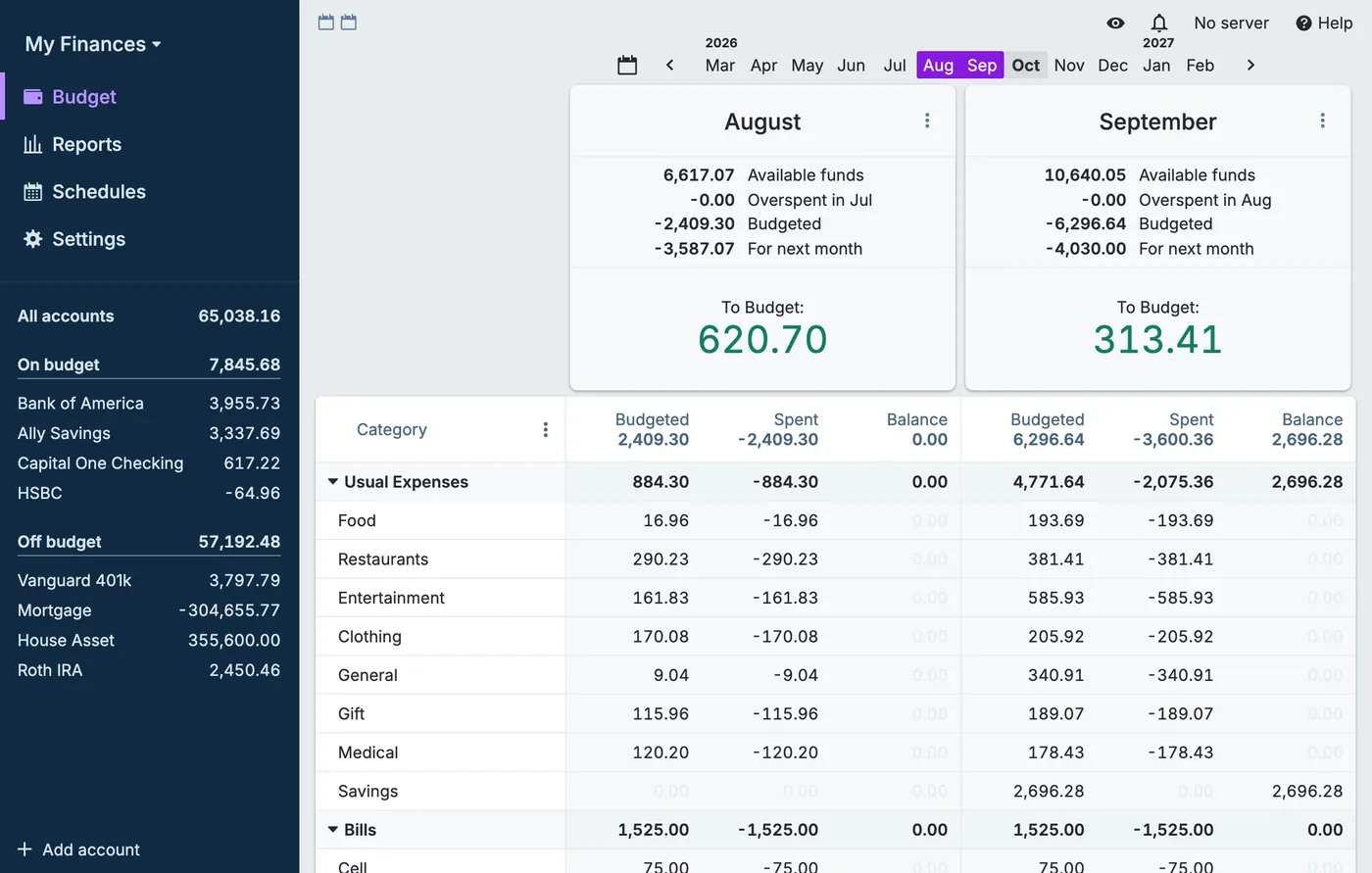
From Actual Budget's help centerA budget with August and September side by side, To Budget amounts of 620.70 and 313.41, category rows with budgeted, spent and balance, and on- and off-budget accounts in the sidebar.actualbudget.org, as of
Control vs convenience: self-hosting explained simply
Self-hosting means you run the software yourself, on your own computer or a server you control. With Actual, you can host the sync server and turn on end-to-end encryption. Source: actualbudget.org (2026) That gives you the most control, and that's a real plus.
The tradeoff is setup. The Actual MCP server needs Node.js, a running Actual install, and an MCP client like Claude Desktop. Source: README (2026) A hosted connector skips that: you paste a link, sign in, and approve.
Safety: write tools and passwords in config
Two things are worth knowing before you connect. First, the MCP config stores your Actual password (ACTUAL_PASSWORD) in a settings file. Second, the tool set can create, change, and delete data, so an AI mistake or a prompt-injection trick could change your budget. Source: README (2026)
A read-only connector you approve by signing in limits that, because there are no write tools to misuse. Neither setup is careless. They make different tradeoffs between control and what an assistant is allowed to do.
Who it's for
Pick the tab that sounds like you. Every answer comes from the app's own pages, and its source opens from the Source link.
Just me
Budgeting on your own? These are the basics people ask about first.
Is it free?
Fifecta: Fifecta costs $15 a month or $150 a year.
Source
pricelesstay.com/fifecta, checked .Actual Budget: Actual is free and open source, and its desktop apps run locally.
Source
github.com/actualbudget/actual, checked .Does it connect to my bank and import transactions?
Fifecta: Optional. Fifecta connects banks through Plaid with read-only access, and you can type your income and spending in by hand instead.
Source
pricelesstay.com/fifecta, checked .Actual Budget: Yes. Actual has built-in bank syncing through goCardless in the EU and UK and SimpleFIN in the US and Canada.
Source
actualbudget.org, checked .Can I export my data?
Fifecta: Yes. You can export your data.
Source
In their words: “Export a copy in Settings, then Your data, before then.” pricelesstay.com/fifecta, checked .Actual Budget: Yes. You can export your data.
Source
In their words: “These range from reconciling and exporting your account to closing or Connecting Your Bank for transaction syncing.” actualbudget.org/docs/tour/accounts, checked .Is there support from the app's makers if I need help?
Fifecta: Yes. Contact form.
Source
In their words: “Questions about these terms? Use our contact form.” pricelesstay.com/fifecta-terms, checked .Actual Budget: Yes. Community Discord (#support channel) and GitHub issues.
Source
In their words: “For questions about installing or using Actual, join our Discord and make a new post in the #support channel” actualbudget.org/docs/community, checked .
Partners
Sharing money with a partner? Here's how each app handles a second person.
Can my partner use their own login details?
Fifecta: Joint accounts, yes. The source doesn't say your partner gets a separate login.
Source
In their words: “You can invite a partner to share your budget. They will be able to see and edit your plan, transactions, and goals, and see the rest of your money in Fifecta.” pricelesstay.com/fifecta-terms, checked .Actual Budget: Yes. Your partner gets their own login.
Source
In their words: “Users with the Basic role can create new budgets and collaborate on budgets made by others.” actualbudget.org/docs/config/multi-user, checked .Can we keep shared and individual views?
Fifecta: Yes. You can keep shared and individual views.
Source
In their words: “Any account, card, loan or investment you mark Only me stays hidden from your partner, along with its transactions and balances.” pricelesstay.com/fifecta, checked .Actual Budget: Yes. You can keep shared and individual views.
Source
In their words: “You can create as many files as you want. This lets you create multiple budgets, isolate accounts, and more.” actualbudget.org/docs/getting-started/manage-files, checked .
Business
Running a small business? Here's what each app says about business money.
Can I share my finances with my accountant?
Fifecta: Yes. You can export your data and send the file.
Source
In their words: “Export a copy in Settings, then Your data, before then.” pricelesstay.com/fifecta, checked .Actual Budget: Yes. You can export your data and send the file.
Source
In their words: “These range from reconciling and exporting your account to closing or Connecting Your Bank for transaction syncing.” actualbudget.org/docs/tour/accounts, checked .
A question shows only when every app here has a current official source that answers it. We only say no when the app's own page does.
Which one fits your Money Type?
A tool works best when it fits how you already handle money. There are four Money Types: Spender, Saver, Scrambler, and Strategist. Whichever setup you choose, here is a good first question for each type. This is education, not a recommendation.
Strategist
“My plan works. I just want it to grow faster.”
A first question to ask your connected budget: “What's my net worth right now?”
First fix: Save the Raise
Spender
“The money is gone before I think about it.”
A first question to ask your connected budget: “What's left in Desires before payday?”
First fix: Sleep on It
Saver
“I save it. Then it just sits there.”
A first question to ask your connected budget: “How much can I save this month?”
First fix: Put It to Work
Scrambler
“Every payday I’m guessing what gets paid first.”
A first question to ask your connected budget: “Which transactions still need a bucket?”
First fix: Bills First
Not sure which one you are? Take the free Money Types quiz. It takes about two minutes.
What real users say
These are other people's opinions, not Priceless Tay's. We quote public reviews and posts word for word, link each one and show its date, but we haven't checked the claims in them. A post counts toward a theme when it uses one of that theme's keywords, so a mention can be praise or a complaint.
What Actual Budget users say
Based on 3 Reddit posts, 7 YouTube videos and 24 Hacker News posts dated Nov 2025 to Oct 2026, read Oct 2026. We collected the Reddit and YouTube data with Apify, a scraping service, on Oct 24, 2026.
- Of the 34 posts and videos we read, 11 mention syncing or connecting accounts.
- Of the 34 posts and videos we read, 7 mention the price, fees or the subscription.
- Of the 34 posts and videos we read, 7 mention how easy or hard the app is to use.
Positive
“Actual Budget is incredible. Happy (now free since it's gone FOSS, formerly paying) customer...”
Mixed
“Switched from ynab4 (used some version since 2011) to Actual Budget a few month ago. Some tiny ux issues, but improvement in many more areas.”
Critical
“Without rollover the app generates a balance that I never entered... an app that does not reflect my real-world balance.”
Where these come from
- Hacker News search for Actual Budget, read Oct 24, 2026. Public search of comments and posts. 64 named the app; we kept 24 where the writer shares their own use of it.
- Reddit search for Actual Budget, collected Oct 24, 2026. Collected with Apify (harshmaur/reddit-scraper) on Oct 24 2026: a keyword search for "Actual Budget app", posts and comments from after Oct 24 2025. It returned 81, most of them about something else. We kept 1 where the writer shares their own use of the app or a clear opinion of it, plus 2 from another app's search that discuss this app. We left out moderators, bots, company accounts, referral posts and people promoting their own apps.
- YouTube search for Actual Budget, collected Oct 24, 2026. Collected with Apify (streamers/youtube-scraper) on Oct 24 2026: a search for "Actual Budget review" from the past year, up to 8 videos. It returned 8. We kept 7 and left out the app's own channel, sponsored videos, videos with affiliate or referral links and videos about a different product. We count themes from each video's title, description and captions, but we don't quote videos, because the captions we have carry no timestamps.
- u/teink0 in r/actualbudgeting on Reddit, Oct 24, 2026.
- u/Rovelocal in r/MoneyDiariesACTIVE on Reddit, Oct 23, 2026.
- u/Chessie37 in r/personalfinance on Reddit, Oct 23, 2026.
- Bigpet on Hacker News, Oct 16, 2026.
- elyobo on Hacker News, Oct 14, 2026.
- cortesoft on Hacker News, Oct 14, 2026.
- "Actual Budget GitHub Overview: Local-First Privacy, Docker Sync, and Encryption Tradeoffs" by Alex Hitt on YouTube, Oct 4, 2026.
- mrkanic on Hacker News, Sep 22, 2026.
- matthiaswh on Hacker News, Jul 17, 2026.
- pwinnski on Hacker News, Apr 25, 2026.
- mapBasketWand on Hacker News, Apr 25, 2026.
- afro88 on Hacker News, Apr 24, 2026.
- "Actual Budget Review: The Free YNAB Replacement" by Jono Finds on YouTube, Apr 8, 2026.
- bombcar on Hacker News, Apr 6, 2026.
- "Actual Budget: The Best Free Envelope Budgeting App (YNAB Alternative)" by Digital Lagoon on YouTube, Mar 18, 2026.
- pcchristie on Hacker News, Mar 17, 2026.
- yevgenyhong on Hacker News, Mar 4, 2026.
- "Actual Budget VS Firefly III 2026 Review - Which Open Source Budgeting Tool Wins?" by Shax Finds on YouTube, Feb 18, 2026.
- "Actual Budget Honest Review 2026: Pros & Cons" by Digital Navigator on YouTube, Feb 15, 2026.
- "The Best Quicken Alternative (Actual Budget Deep Dive)" by tektoc on YouTube, Jan 5, 2026.
- spiffytech on Hacker News, Jan 2, 2026.
- spiffytech on Hacker News, Jan 2, 2026.
- loloquwowndueo on Hacker News, Jan 2, 2026.
- "Actual Budget vs Firefly III (2026) – Which Open-Source Budgeting Tool Wins?" by Digibase Media on YouTube, Jan 1, 2026.
- Ronnie76er on Hacker News, Nov 22, 2025.
- meonkeys on Hacker News, Nov 22, 2025.
- ekhaliul on Hacker News, Nov 22, 2025.
- duskdozer on Hacker News, Nov 22, 2025.
- nirvdrum on Hacker News, Nov 21, 2025.
- Terr_ on Hacker News, Nov 21, 2025.
- Semaphor on Hacker News, Nov 21, 2025.
- DarmokJalad1701 on Hacker News, Nov 21, 2025.
- brandonjcooper on Hacker News, Nov 21, 2025.
- CarlJW on Hacker News, Nov 9, 2025.
Try the free Budget Prompt Generator
Pick your Money Type, your goal, and the AI you use, and get budgeting prompts to copy into ChatGPT, Claude, or another assistant. Open the Budget Prompt Generator on its own page.
FAQ
What is the best MCP for money?
It depends on whose money and how you want to run it. Business tools are built for company payments and spending. For your own money, the choice is mostly self-hosted (like an Actual Budget MCP server you run yourself) or hosted (like Fifecta's connector, which we make).
Does Actual Budget have an MCP server?
Community servers exist. One example is s-stefanov/actual-mcp, a community project that's not listed as made by Actual.
Can the Actual Budget MCP change my budget?
Yes. The s-stefanov/actual-mcp README lists write and delete tools, including create and update transaction, delete category, and delete rule. Source: README.
Is Actual Budget open source?
Yes. Actual is released under the MIT license. Source: GitHub.
Do I need to code to use Fifecta's connector?
No. You paste the connector link into your assistant, sign in to Fifecta, and approve. See the steps.
Can I use an Actual Budget MCP with ChatGPT?
We couldn't confirm it. The README names Claude Desktop "or another MCP-compatible client," so check the project's docs. Source: README.
More comparisons
Similar comparisons








Keep comparing
- See Actual Budget alternatives, closest category first.
- Want the bigger picture? Compare more money apps.
Full disclosure: Taylor Price, who runs Priceless Tay, owns Fifecta, so keep that in mind as you read this comparison.
Want a plan built on your Money Type?
Fifecta gives every paycheck a plan with FUNDS, so you know where each dollar goes.
Sources and confidence
- Last checked
- Sourced facts
- 12 facts, each linked and dated
FifectaOur app6 sourced facts, last checked Oct 25, 2026
- Price and feespricelesstay.com/fifecta, as of Oct 25, 2026
- Free trialpricelesstay.com/fifecta, as of Oct 25, 2026
- Platformspricelesstay.com/fifecta, as of Oct 25, 2026
- Bank syncingpricelesstay.com/fifecta, as of Oct 25, 2026
- Featurespricelesstay.com/fifecta-ai, as of Oct 25, 2026
- App store ratingpricelesstay.com/fifecta, as of Oct 25, 2026
Actual Budget6 sourced facts, last checked Oct 25, 2026
- Price and feesgithub.com/actualbudget/actual, as of Oct 25, 2026
- Free trialgithub.com/actualbudget/actual, as of Oct 25, 2026
- Platformsactualbudget.org/download, as of Oct 25, 2026
- Bank syncingactualbudget.org, as of Oct 24, 2026
- Featuresactualbudget.org/docs/tour/accounts, as of Oct 24, 2026
- App store ratingactualbudget.org/docs/faq, as of Oct 25, 2026
Fifecta is our own app. Taylor Price, who runs Priceless Tay, owns Fifecta, so keep that in mind as you read this comparison.
Each fact links to the official page it came from, with the date we checked it. Once a fact is older than its app's window (8 days for apps whose rates change often, 35 days for the rest), it comes off the page until we check it again. How we source, date and index this data.
Third-party names belong to their owners. Fifecta is a Priceless Tay product.
This is education, not financial advice.